|
Curso de Photoshop 6.0
45 Cabeza
Tornillo Step 1 Open a new document 75x75 pixels with a background of your choice.
Draw a circle using the Elliptical Marquee tool. Step 2 Create a new layer and fill the selection using the Radial
Gradient tool with white as the foreground and black as the
background. Step 3 Create a new layer, and name it shadow. Now with the selection
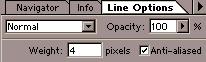
still on, draw a black line using the Line tool, set the weight to 4
pixels using the Line Options. Step 4 Next duplicate the shadow layer, and press Ctrl+I to invert and
nudge the duplicate layer 2 pixels to the right using the arrow keys
on your keyboard (Ctrl-arrow key).
Espero que les sirva
de algo la ayudita
|
|
|