|
Curso de Photoshop 6.0
44 Esfera
3D Step 1 Open a new document with a background of your choice. Draw a
circle using the Elliptical Marquee Tool. Step 2 Fill the selection using the Radial Gradient tool with white as
the foreground and black as the background. Don't forget to select
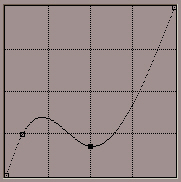
foreground to background in the Gradient Options. Step 3 Now for the cool satin effect we will go to Image> Adjust> Curves
and adjust the setting as shown below. Set the weight to 4 pixels
using the Line Options. Step 4 To apply color, go to Image> Adjust> Variations. Make sure the 'Midtones'
is ticked. Now apply the selected color or combinations of colors to
create your sphere.
Espero que les sirva
de algo la ayudita
|
|
|



 Use the Shift Key to get a perfect circle.