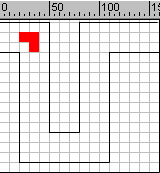
You need to create the tube and the object to travel through it in
this project.
Create a new file.
View > Rulers
View > Grid > Show Grid
View > Grid > Edit Grid (10 X 10 px)
Drag the horizontal & vertical guide lines to get the center.
View > Guides > Lock Guides
Step 2
Create the tube like structure as shown using Line Tool.
Step 3
Drag the Arrow Tool from 40 to 1 st frame to select the segment.
Modify > Frames > Convert to Key frames
Step 4
All the frames will be converted into key frames.
Select 1st frame. Deselect the selection in the artwork by pressing Esc
key.
Now we will draw the object, made up of rectangle which will travel
through the tube.
Draw a small rectangle using Rectangle Tool at the starting point of the
tube. Keep the length of the object fixed.
Using > key move to the next frame. With the advancement of each frame
draw the rectangle ahead with the constant increment.
At the turning point draw the object as shown in the above figure.
Save the file.