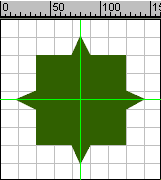
Drag the horizontal & vertical guide lines to get the center.
View > Guides > Lock Guides
Select Oval Tool. Choose fill color. Stroke color should be none. Draw
the circle.
Rightclick on the 5 th frame. Select insert keyframe to keep the same
shape for next five frames.
Rightclick on the 15 th frame. Select insert Blank keyframe.
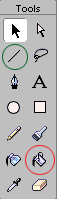
With the help of Line Tool (green marked) and Paint Bucket Tool (red
marked) draw shape and fill it with different color.