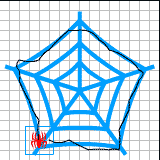
Drag the horizontal & vertical guide lines to get the center.
View > Guides > Lock Guides
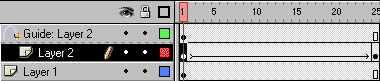
Create two layers. One for static object and one for dynamic.
Draw the net on the bottom layer. You can get it from 'Webdings' font.
Rightclick on the 25 th frame. Select insert frame to keep the net for
25 frames.
Place spider on the 1st frame of the top layer. Select it.
Modify > Group
Rightclick on the 25 th frame. Select insert keyframe.
Move the spider at any place within the net.
Tween the animation.
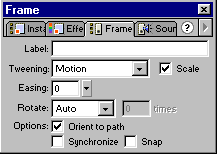
Modify > frame