Create new file.
Display the Rulers
View > Rulers
Drag the horizontal & vertical guide lines to get the center.
View > Guides > Lock Guides
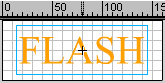
Type the text. Select it with Arrow Tool.
Insert > Convert to Symbol
Name the symbol.
Symbol makes the work easy. You will find the cross mark at the center
of the text.
Keep the Arrow Tool on the cross mark and drag the text to the center of
the stage. Align exactly at the center.
Insert key frame at 10 and 20.