Curso de Flash
Move & Fade
Step 1

For Move & Fade, create new file with 200 X 100 dimension.
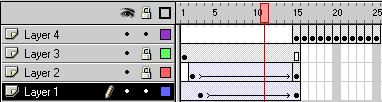
Create 4 layers.

Step 2

Type the text on the 3rd layer. Right click on 15 th frame and select insert frame. Copy the first frame.

Step 3

Paste the frame on the 2 nd layer on the frame no. 2. Change the color. Right click on the 15 th frame and select Insert keyframe.

Select 15 th frame and move the text with Arrow tool towards bottom right. In the time line keep the pointer on 15 and right click. Select Create Motion Tween.

Step 4

Repeat the step 4 for layer one. Paste the frame on frame no 3.
Change the color. Right click on the 15 th frame and select Insert keyframe.
Select 15 th frame and move the text with Arrow tool towards top left.
In the time line keep the pointer on 15 and right click. Select Create Motion Tween.

Step 5

Select 4th layer. Paste the frame on frame no. 15. Add keyframe till 25. Change the color of each frame using alpha from mixer.


Espero que les sirva de algo la ayudita


Hosted by www.Geocities.ws

1