Containers Layouts Widgets
- button
- checkbox
- combo
- label
- list
- menubar
- radiobutton
- splitpane
- table
- textfield
- textarea
- toolbar
- tree
Widgets -> tree
[PENDING: Document needs update.]
You must be familiar with multi-dimensional arrays before working with trees. When creating trees, the first item of an array is always the "parent" category.
Syntax:
tree(@data [, properties]);
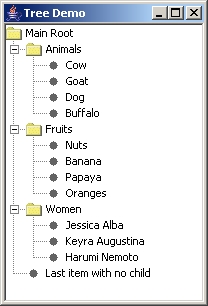
alias treedemo {

  # Create the data first..
  @treeData = array("Main Root",
                 array("Animals",
                         "Cow",
                         "Goat",
                         "Dog",
                         "Buffalo"),
                 array("Fruits",
                         "Nuts",
                         "Banana",
                         "Papaya",
                         "Oranges"),
                 array("Women",
                         "Jessica Alba",
                         "Keyra Augustina",
                         "Harumi Nemoto"),
                 "Last item with no child");

  # Create the frame..
  $tframe = frame("Tree Demo", 'center=1', 'size=500 400');
  $tpanel = panel($tframe, 'layout=Border');

  # Now the tree..
  $mytreeSample = tree(@treeData, 'command=&myTreeListener', 'root=single');
  addWidget($tpanel, $mytreeSample, 'area=CENTER');

  show($tframe);
}
sub myTreeListener {
   $var = getSelectedNode($mytreeSample);
   echo("Selected item: $var");
   echo("Parent: " . getParent($var));
}
Properties
| Name | Value | Description |
| command | Name of closure | This will trigger the closure when a tree item is selected. |
| font | fontsize fontname | Specifies the font to be used for the tree. |
| fontstyle | PLAIN, BOLD, or ITALIC | Specifies the fontstyle to be used. Must be used with font property above. |
| root | SINGLE or MULTIPLE | Denotes whether the tree will only have one main category or many |
| leaficon | Image filename | Icon for a leaf. A leaf is a tree item with no subcategory. |
| openicon | Image filename | Icon for a "open" item. (For example, in Windows explorer, a selected folder in explorer) |
| closedicon | Image filename | Icon for closed item. |
Related functions
- getSelectedNode($tree) - Returns the text string (or tree item) that is currently selected.
- getParent($selectedNode) - Returns the category of the selected node.