Containers Layouts Widgets
- button
- checkbox
- combo
- label
- list
- menubar
- radiobutton
- splitpane
- table
- textfield
- textarea
- toolbar
- tree
Widgets -> checkbox
To create a checkbox, use the following syntax:
$checkbox = checkbox('Label' [, properties]);
Label refers to a string or text that will appear in the checkbox. See table below for the list of properties.
Here is an example of checkboxes.
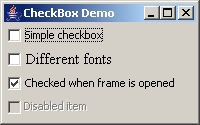
The snippet below shows how the above demo was created.
alias checkboxdemo {
  $cb_frame = frame("CheckBox Demo", "size=200 125", "center=1");
  $cb_panel = panel($cb_frame, "layout=grid 4 1");

  $cb1 = checkbox("Simple checkbox", "command=&cb1");
  $cb2 = checkbox("Different fonts", "command=&cb2", "font=15 Times New Roman");
  $cb3 = checkbox("Checked when frame is opened", "command=&cb3", "checked=1");
  $cb4 = checkbox("Disabled item", "state=0");

  add($cb_panel, $cb1);
  add($cb_panel, $cb2);
  add($cb_panel, $cb3);
  add($cb_panel, $cb4);

  show($cb_frame);
}

sub cb1 { echo("You checked \$cb1"); }
sub cb2 { echo("You checked \$cb2"); }
sub cb3 {
  echo("You checked \$cb3");
  echo("Label of \$cb3 is \b" . getText($cb3));
}
Properties
| Name | Arguments | Desc | Example |
| command | subroutine name | This specifies the subroutine that will be performed when the checkbox is clicked. Make sure the subroutine name must be prefixed with a &. | $c = checkbox('Text','command=&SomeSub'); |
| tooltip | text | This specifies the tooltip text when the mouse is hovered over the checkbox. | $c = checkbox('Text', 'tooltip=Lorem ipsum whatever'); |
| state | 1 or 0 | Specifies the initial state of the checkbox. 1 is enabled (also the default), and 0 is disabled. | $c = checkbox('Text', 'state=0'); |
| fgcolor | COLOR | Specifies the foreground color, or the color of the text of the checkbox. | $c = checkbox('Text', 'fgcolor=GREEN'); |
| bgcolor | COLOR | Specifies the background color of the checkbox. | $c = checkbox('Text', 'bgcolor=GRAY'); |
| font | fontsize fontname | This specifies the font of the checkbox label. A font size MUST be specified along with the font name. | $c = checkbox('Text', 'font=14 Times New Roman'); |
| fontstyle | BOLD, ITALIC or NORMAL | This specifies the font style of the checkbox label. This MUST be used with the font property above. | $c = checkbox('Text', 'font=14 Times New Roman', 'fontstyle=BOLD'); |
| bounds | x y w h | .. | .. |
These properties are optional and can be in any order.
Related commands and functions
| enable($checkbox) | Self-explanatory. |
| disable($checkbox) | Self-explanatory. |
| check($checkbox) | Self-explanatory. |
| uncheck($checkbox) | Self-explanatory. |
| isChecked($checkbox) | Returns 1 if the checkbox is checked, and 0 if not. |
| getText($checkbox) | Returns the associated text or the label of that checkbox. |