Containers Layouts Widgets
- button
- checkbox
- combo
- label
- list
- menubar
- radiobutton
- splitpane
- table
- textfield
- textarea
- toolbar
- tree
Widgets -> radiobutton
To create a radiobutton, use the following syntax:
$radio = radiobutton('Label' [, properties]);
Label refers to a string or text that will appear in the radiobutton. See table below for the list of properties.
The Label can also be in HTML code. For example:
$htmlString = '<html>This is <b>bold</b> and <i>italic</i> and <u>underline</u>.</html>';
$radiobutton = radiobutton($htmlString);
# add $radiobutton to some container..
However, HTML support is limited to HTML3.2 only.
Here is an example of radiobuttons.
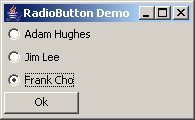
The snippet below shows how the above demo was created.
alias radiodemo {

  $radioFrame = frame('RadioButton Demo', 'center=1', 'size=195 120');
  $radioPanel = panel($radioFrame, 'layout=box vertical');

  $radio1 = radiobutton("Adam Hughes");
  $radio2 = radiobutton("Jim Lee", "command=&qwertyuiop");
  $radio3 = radiobutton("Frank Cho");

  # The radiobuttons MUST be in a buttongroup()
  $radioBtnGroup = buttongroup($radio1, $radio2, $radio3);

  # Add the INDIVIDUAL radiobuttons to the container and NOT the group.
  addWidget($radioPanel, $radio1);
  addWidget($radioPanel, $radio2);
  addWidget($radioPanel, $radio3);

  $buttonCloser = button('Ok', 'command=&radioDemoAction', 'size=75 22');
  addWidget($radioPanel, $buttonCloser);

  show($radioFrame);

}
sub qwertyuiop {
  echo("\$radio2 was selected");
}
sub radioDemoAction {
  $sel = getText(getSelectedRadio($radioBtnGroup));
  if ($sel) { echo("The selected option was\b $sel"); }
  else { echo("No selection made"); }
  close($radioFrame);
}
It is important to have a buttongroup() to distinguish which group a radiobutton belongs to.
Below is an example of two groups of radio buttons.

The code below generated the above demo.
alias radiodemo2 {
  $_f = frame("RadioButton Demo - Part 2", 'center=1');
  $_p = panel($_f, 'layout=gridbag');

  # Create boxes
  $commonOptions = options('layout=box vertical', 'size=150 150');
  $bandpanel = boxpanel('', 'title=Bands', $commonOptions);
  $solopanel = boxpanel('', 'title=Solo Artists', $commonOptions);

  # Constraints for GridBagLayout
  $bconstr = constr('row=0', 'column=0', 'fill=both',
                    'weightx=0.5', 'weighty=1.0');
  $sconstr = constr('row=0', 'column=1', 'fill=both', 'weightx=0.5');
  $oconstr = constr('row=1', 'column=0',
                    'anchor=center', 'colspan=2', 'insets=10 1 3 1');

  # Add the boxes to main panel
  addWidget($_p, $bandpanel, $bconstr);
  addWidget($_p, $solopanel, $sconstr);
  addWidget($_p, button('Ok', 'command=&moreRadioTests', 'size=100 23'), $oconstr);

  # Band group
  $band1 = radiobutton('Linkin Park');
  $band2 = radiobutton('Disagree');
  $band3 = radiobutton('Korn');
  $bands = buttongroup($band1, $band2, $band3);
  addWidget($bandpanel, $band1);
  addWidget($bandpanel, $band2);
  addWidget($bandpanel, $band3);

  # Solo group
  $solo1 = radiobutton('Avril Lavigne');
  $solo2 = radiobutton('James Blunt');
  $solo3 = radiobutton('Frank Sinatra');
  $solos = buttongroup($solo1, $solo2, $solo3);
  addWidget($solopanel, $solo1);
  addWidget($solopanel, $solo2);
  addWidget($solopanel, $solo3);

  ppack($_f);
  show($_f);
}
sub moreRadioTests {
  echo("Selection for bands: " . getText(getSelectedRadio($bands)));
  echo("Selection for solo artists: " . getText(getSelectedRadio($solos)));
  # Closing of the frame must ALWAYS be the last.
  close($_f);
}
The buttongroup() does not need to be added to any container.
Properties
| Name | Arguments | Desc | Example |
| command | subroutine name | This specifies the subroutine that will be performed when the radiobutton is clicked. Make sure the subroutine name must be prefixed with a &. | $r = radiobutton('Text','command=&SomeSub'); |
| tooltip | text | This specifies the tooltip text when the mouse is hovered over the radiobutton. | $r = radiobutton('Text', 'tooltip=Lorem ipsum whatever'); |
| state | 1 or 0 | Specifies the initial state of the radiobutton. 1 is enabled (also the default), and 0 is disabled. | $r = radiobutton('Text', 'state=0'); |
| checked | 1 or 0 | Specifies whether this radiobutton is the default selection. The default value is 0. | $r = radiobutton('Text', 'checked=1'); |
| fgcolor | COLOR | Specifies the foreground color, or the color of the text of the radiobutton. | $r = radiobutton('Text', 'fgcolor=GREEN'); |
| bgcolor | COLOR | Specifies the background color of the radiobutton. | $r = radiobutton('Text', 'bgcolor=GRAY'); |
| font | fontsize fontname | This specifies the font of the radiobutton. A font size MUST be specified along with the font name. | $r = radiobutton('Text', 'font=14 Times New Roman'); |
| fontstyle | BOLD, ITALIC or NORMAL | This specifies the font style of the radiobutton. This MUST be used with the font property above. | $r = radiobutton('Text', 'font=14 Times New Roman', 'fontstyle=BOLD'); |
| bounds | x y w h | .. | .. |
These properties are optional and can be in any order.
Related commands and functions
| enable($radiobutton) | Self-explanatory. |
| disable($radiobutton) | Self-explanatory. |
| check($radiobutton) | Self-explanatory. |
| uncheck($radiobutton) | Self-explanatory. |
| isChecked($radiobutton) | Returns 1 if the radiobutton is selected, and 0 if not. |
| getText($radiobutton) | Returns the associated text or the label of that radiobutton. |
| getSelectedRadio($radiobuttongroup) | Returns the current selected radiobutton of the given group. |