Containers Layouts Widgets
- button
- checkbox
- combo
- label
- list
- menubar
- radiobutton
- splitpane
- table
- textfield
- textarea
- toolbar
- tree
Widgets -> toolbar
[PENDING: Document is not finished]
Notes: Toolbars are draggable by default. Toolbar containers (panels) must use BorderLayout. If other widgets are occupying other 'side' areas (TOP, LEFT, RIGHT, BOTTOM) then the toolbar cannot be dragged to those areas.
Properties:
- hover - Can be 1 or 0. Buttons are 'hover' buttons or not.
- fixed - Can be 1 or 0. Toolbar draggable or not.
- buttontext - Options are left or bottom. Position of text of toolbar buttons (if any).
Methods:
- toolAdd(toolbar, widget); Adds widget to toolbar.
- toolRemove(toolbar, widget); Removes widget from toolbar.
- toolAddSeparator(toolbar);
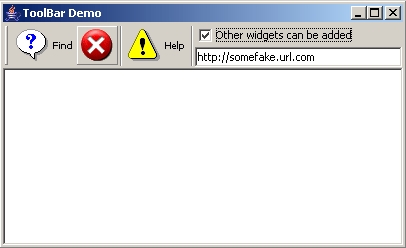
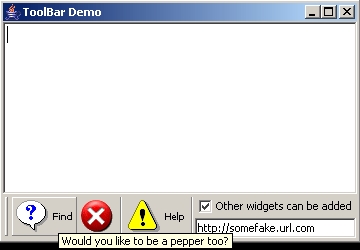
alias toolbardemo {
  $f = frame("ToolBar Demo", 'center=1');

  # For toolbars, its container must have BorderLayout.
  $p = panel($f, 'layout=border');

  # Create toolbar
  $toolbar = toolbar("Test", 'hover=1');

  $opt = options('font=10 Tahoma', 'fontstyle=PLAIN');
  $b1 = button("Find",'icon=icons/ask.png','command=&b1a', $opt,
               'tooltip=Would you like to be a pepper too?');
  $b2 = button("",'icon=icons/error.png','command=&b2a', $opt);
  $b3 = button("Help", 'icon=icons/warn.png', $opt);

  # Add buttons to the toolbar
  toolAdd($toolbar, $b1);
  toolAdd($toolbar, $b2);
  toolAddSeparator($toolbar);
  toolAdd($toolbar, $b3);
  toolAddSeparator($toolbar);

  # Non-buttons are ok..
  $subp = panel('layout=box vertical');
  addWidget($subp, checkbox("Other widgets can be added"));
  addWidget($subp, textfield("http://somefake.url.com"));
  toolAdd($toolbar, $subp);

  addWidget($p, $toolbar, 'area=TOP');
  addWidget($p, textarea(), 'area=CENTER');

  ppack($f);
  show($f);
}
sub b1a { echo("Find icon"); }
sub b2a { echo("Exit icon"); }
- End of page -