Containers Layouts Widgets
- button
- checkbox
- combo
- label
- list
- menubar
- radiobutton
- splitpane
- table
- textfield
- textarea
- toolbar
- tree
Layouts -> BoxLayout
BoxLayout allows you to add components similar to that of FlowLayout. However, with BoxLayout, the components do not 'wrap'. Therefore, a group of components in a horizontal or vertical line will remain in the line when the container is resized.
BoxLayout also allows you to arrange the components vertically or horizontally.
One unique feature of BoxLayout is that the components will not be resized even if their container is resized.
Syntax
$p = panel('layout=box direction [alignment]');
In the above, direction refers to the direction of the layout. For left-to-right layout, specify HORIZONTAL; for top-to-bottom, specify VERTICAL.
Alignment refers to the components' alignment in relation to their container. For horizontal layouts, the alignment values are TOP, BOTTOM, and CENTER (default value). For vertical layouts, the alignment values are LEFT (default value), RIGHT, and CENTER.
In a vertical layout, LEFT alignment means all the components in that container will be left-aligned. The image below shows the effect of a panel that has a BoxLayout, vertical direction, and with a left alignment.
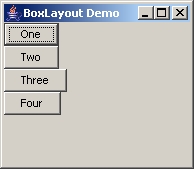
The code for the above is shown below.
$box_frame = frame('BoxLayout Demo', 'center=1');
$box_panel = panel($box_frame, 'layout=box vertical left');
addWidget($box_panel, button("One"));
addWidget($box_panel, button("Two"));
addWidget($box_panel, button("Three"));
addWidget($box_panel, button("Four"));
ppack($box_frame);
show($box_frame);
In the above snippet, if left is not specified, the effect is the same because it is the default. If it is changed to center, the effect is as shown in the image below.
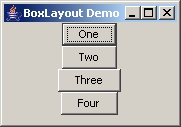
The line would simply be changed to the following:
$box_panel = panel($box_frame, 'layout=box vertical center');
And finally, if we changed center to right, the effect would be as follows.
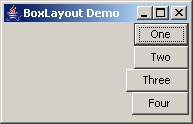
And a quick look at boxlayouts with horizontal arrangement..
The image below shows a layout with TOP alignment.
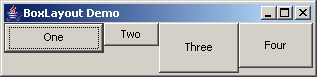
Next is CENTER alignment and the default value.
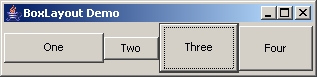
And you can guess this one..
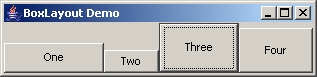
[PENDING: Document is not finished]
Methods specific to BoxLayout: (both are smart enough to know if BoxLayout is vertical or horizontal)
- boxAddGlue(container_with_boxlayout);
Adds a glue filler between widgets. Keeps them as far apart as possible when frame is resized. - boxAddFiller(container, w, h);
Adds filler with fixed width and height. Rigid area.