Containers Layouts Widgets
- button
- checkbox
- combo
- label
- list
- menubar
- radiobutton
- splitpane
- table
- textfield
- textarea
- toolbar
- tree
Layouts -> CardLayout
CardLayout helps you manage two or more components that share the same display space. Only one component will be shown at a time, and your script must provide the option to let your user choose which component they want to show.
The image below shows a dialog box with a combo list and a panel below it. There are actually two more panels that are not shown.
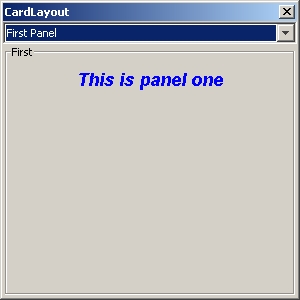
When a selection is made from the combo list, the panel changes accordingly. The next image shows the second panel.
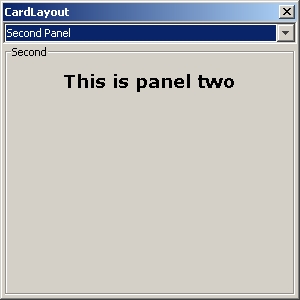
And finally, the third.

The snippet below shows how the dialog and the card layout was done.
alias cardlayout {
   $cl = dialog(None, "title=CardLayout", 'center=1', 'size=300 300');
   $cp = panel($cl, 'layout=border');

   @descriptions = array('First Panel', 'Second Panel', 'Third Panel');
   # Note the command for the combo. This will allow selection later.
   $chooser_combo = combo(@descriptions, 'command=&card_chooser');
   add($cp, $chooser_combo, 'area=top');


   # This is where the panel with the card layout is made
   $cardholder = panel('layout=card');
   add($cp, $cardholder, 'area=center');

   # These are the boxpanels sharing the same space
   $p1 = boxpanel('title=First' , 'layout=flow');
   $p2 = boxpanel('title=Second', 'layout=flow');
   $p3 = boxpanel('title=Third' , 'layout=flow');

   $l1 = label("This is panel one", "font=18 Arial", 'fontstyle=ITALIC BOLD', "fgcolor=blue");
   $l2 = label("This is panel two", "font=18 Verdana", "fontstyle=BOLD");
   $l3 = label("This is panel three", 'font=18 Times New Roman')

   add($p1, $l1);
   add($p2, $l2);
   add($p3, $l3);

   # Make any text to describe the components that share space
   # In this case, the boxpanels above
   $p1_description = "First Panel";
   $p2_description = "Second Panel";
   $p3_description = "Third Panel";

   # Make sure the description is the second parameter in add()
   add($cardholder, $p1, "desc=$p1_description");
   add($cardholder, $p2, "desc=$p2_description");
   add($cardholder, $p3, "desc=$p3_description");

   show($cl);
}
# This is the subroutine that will show the panel which was chosen.
sub card_chooser {
   cardShow($cardholder, getSelectedItem($chooser_combo));
}
The most important thing in cardlayouts is to have a description for the components. In the above example, if the "Second Panel" was selected from the combobox, $p2 panel will be shown because it has that description. It doesn't matter what description you want to make, as long as they don't conflict with other descriptions.
Please refer to the other sections on how to use the other components used in the above example.
Syntax and related functions
| Command | Description |
| cardShow($cardArea, description) | This shows the component with the matching description. |
| cardFirst($cardArea) | Shows the first component that was added to the area with the card layout. |
| cardNext($cardArea) | Shows the 'next' component. If the current component shown is the last, it will show the first component. |
| cardLast($cardArea) | Shows the last component that was added. |
| cardPrevious($cardArea) | Self-explanatory. |