Containers Layouts Widgets
- button
- checkbox
- combo
- label
- list
- menubar
- radiobutton
- splitpane
- table
- textfield
- textarea
- toolbar
- tree
Containers -> dialog
A dialog is similar to a frame. It can contain widgets (buttons, lists, etc). But the difference is, it can be made modal, i.e. a state wherein the user must complete a selection and/or close the dialog box or window before using another dialog box or window. Another difference is that a dialog cannot have an icon in the titlebar.
The snippet below shows how to create a simple dialog:
alias dlg {
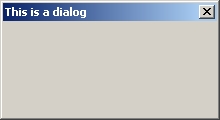
  $dlg = dialog($null, "title=This is a dialog", "size=220 120");
  show($dlg);
}
The resulting dialog is as shown in the image below:
Syntax and properties
$dialog = dialog(parent, "title=Title" [, properties]);
Notice that the first parameter is always a parent. A parent means a frame, or another dialog. $null can also be the first parameter if the dialog does not have a parent frame/dialog.
Supposing a frame with the name $CustomFrame is already created, then the child dialog should be created like this:
$d = dialog($CustomFrame, "title=My dialog");
Otherwise, the first parameter MUST be $null always.
Dialog properties | |||
| Name | Arguments | Desc | Example |
| size | [x y] w h | This specifies the size of the dialog. X and Y are optional values. W and H means width and height respectively. | $d = dialog($null, 'title=Title', 'size=10 10 300 200'); |
| resizable | 1 or 0 | This allows resizing of a dialog. By default, dialogs are not resizable. | $d = dialog($null, 'title=Resizable dialog','resizable=1'); |
| center | 1 or 0 | This specifies that the dialog should be centered in the screen when it is first opened. | $d = dialog($null, 'title=Centered dialog', 'center=1'); |
| modal | 1 or 0 | Specifies the mode of the dialog. 1 means modal (prevents further action until the dialog gets what it wants or until the dialog is closed). By default, dialogs are modal. | $d = dialog($null, 'title=Modal dialog', 'modal=1'); |
These properties are optional and can be in any order.
Related commands and functions
| setInitialFocus($dialog, $widget) | Sets default focus on that widget (button, checkbox, etc) when $dialog is first opened. This must be called BEFORE showing the dialog. |
| show(dialog) | Shows the dialog. This is called after adding all the components to the dialog or to unhide a hidden one. |
| hide(dialog) | Self-explanatory. |
| close(dialog) | Self-explanatory. |
| setframesize(dialog,"[x y] w h") | Sets the size of a dialog. The x and y are optional. This command can also be used to resize an existing dialog. |
| insets(dialog) | No info available yet. |