Containers Layouts Widgets
- button
- checkbox
- combo
- label
- list
- menubar
- radiobutton
- splitpane
- table
- textfield
- textarea
- toolbar
- tree
Containers -> frame
A frame is a window that can contain child components (or widgets). It can be resized, minimized, maximized, etc.
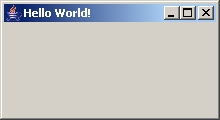
The snippet below shows how to create a simple frame:
alias simpleFrame {
   $myFirstFrame = frame("Hello World!", 'size=220 120');
   show($myFirstFrame);
}
The resulting frame is as shown in the image below:
Syntax and properties
$frame_name = frame("Title" [, properties]);
Frame properties | |||
| Name | Arguments | Desc | Example |
| size | [x y] w h | This specifies the size of the frame. X and Y are optional values. W and H means width and height respectively. | $f = frame('Title', 'size=10 10 300 200'); |
| icon | filename | This specifies the icon that will be shown in the frame's titlebar. | $f = frame('Different icon', 'icon=somefile.png'); |
| resizable | 1 or 0 | This specifies whether the frame is resizable. A 0 value means the frame is not resizable. By default, frames are resizable. | $f = frame('Test','resizable=0'); |
| center | 1 or 0 | This specifies that the frame should be centered in the screen when it is first opened. | $f = frame('Test', 'center=1'); |
| state | ICONIFIED or MAXIMIZED | Specifies the state of the frame when opened. In Windows, ICONIFIED is the same as minimized. | $f = frame('Name', 'state=MINIMIZED'); |
These properties are optional and can be in any order. The frame will still open without any of them.
Related commands and functions
| setInitialFocus($frame, $widget) | Sets default focus on that widget (button, checkbox, etc). when $frame is first opened. This must be called BEFORE showing the frame. |
| pack($frame) | This adjusts the size of the frame so that all the components that have been added to it will fit accordingly. This is called just before show() command. If you do not specify the size of the frame, then use pack() to resize it automatically. |
| show($frame) | Shows the frame. This is called after adding all the components to the frame or to unhide a hidden frame. |
| hide($frame) | Self-explanatory. |
| close($frame) | Self-explanatory. |
| setframesize($frame,"[x y] w h") | Sets the size of a frame. The x and y are optional. This command can also be used to resize an existing frame. |
| insets($frame) | No info available yet. |