Containers Layouts Widgets
- button
- checkbox
- combo
- label
- list
- menubar
- radiobutton
- splitpane
- table
- textfield
- textarea
- toolbar
- tree
Containers -> boxpanel
A boxpanel is similar to that of a panel. The difference is, a boxpanel can have a title and always has a border. The image below shows a boxpanel in action:
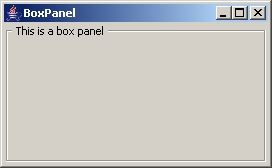
The snippet below shows how to create the boxpanel above:
alias boxpanel {
  $f = frame("BoxPanel", "size=220 120");
  $boxpanel = boxpanel($f, 'layout=Flow', 'title=This is a box panel');
  show($f);
}
Similarly with a panel, the first parameter can also be a frame. A boxpanel is normally used to group widgets together, for instance, a group of radiobuttons.
Syntax and properties
$boxpanel = boxpanel([$frame or $null , properties]);
As with a panel, all the parameters of a boxpanel() are optional.
Panel properties | |||
| Name | Arguments | Desc | Example |
| layout | name [args] | "name" stands for the layout type and [args]. See layout for more info. | $bp = boxpanel('layout=grid 3 3'); |
| size | w h | This specifies the (w)idth and (h)eight of the panel. | $bp = boxpanel('size=100 85'); |
| color | COLORNAME | This specifies the color of the panel. See color section for more info on available colors. | $bp = boxpanel('color=DARK_GRAY'); |
| title | Any text | This specifies the title of the boxpanel. | $bp = boxpanel('title=Title'); |
| font | fontsize fontname | This specifies the font of the title. A font size MUST be specified along with the font name. | $bp = boxpanel('title=Title', 'font=14 Verdana'); |
| fontstyle | BOLD, ITALIC or NORMAL | This specifies the font style of the title. This MUST be used with the font property above. | $bp = boxpanel('font=14 Verdana', 'fontstyle=BOLD'); |
These properties are optional and can be in any order.