Containers Layouts Widgets
- button
- checkbox
- combo
- label
- list
- menubar
- radiobutton
- splitpane
- table
- textfield
- textarea
- toolbar
- tree
Widgets -> table
The syntax to create a table is:
table(@columnHeaders [,properties]);
Below is an example of a table:
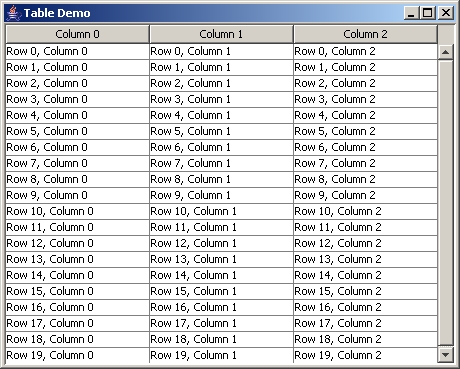
The code that created the above table is:
alias tabledemo {

   $tFrame = frame('Table Demo', 'center=1');
   $tPanel = panel($tFrame, 'layout=Border');

   @table_headers = array('Column 0', 'Column 1', 'Column 2');
   $tTable = table(@table_headers);

   # See below for details of this subroutine
   addTableData($tTable);

   addWidget($tPanel, $tTable, 'area=CENTER');
   ppack($tFrame);
   show($tFrame);

}

sub addTableData {
   for ($row = 0; $row < 20; $row++) {
      @rowData = array();
      for ($col = 0; $col < 3; $col++) {
        $string = "Row $row $+ \, Column $col";
        push(@rowData, $string);
      }
      insertRow($1, $row, @rowData);
   }
}
All tables have editable cells for now. Tables with no data will have grayed-out area. This is default Java Swing's JTable behavior.
Properties
| Properties | ||
| Name | Value | Description |
| rows | Any integer | Total number of rows. |
| selectmode | SINGLE, MULTIPLE_INTERVAL or SINGLE_INTERVAL | Determines the selection mode of the table. See list() for explanation of the selection modes. |
| font | fontsize fontname | Specifies the font to be used in the table data. |
| fontstyle | PLAIN, BOLD, or ITALIC | Specifies the font style. Must be used with font property. |
Related functions
| Function | Description |
| setValueAt($table, string, row, column) | Sets the value at specified row and column. Any previous value at that row and column will be replaced. This must be used only if there is already data in the table. If the table is still empty, use insertRow() to add data. Example: |
| getValueAt($table, row, column) | Returns the value at specified row and column. |
| getSelectedRow($table) | Returns the Nth selected row of $table. |
| addRow($table, @array) | Adds a row to $table with @array as the data. The size (or number of items) in the @array has to match the number of columns. If they are lesser than the number of columns, the rest of the columns of the newly-added row will be empty. |
| removeRow($table, N) | Removes Nth table row. |
| insertRow($table, N, @array) | Inserts a row at Nth position with @array as data. Example: |
| rowCount($table) | Returns total number of rows. |
| addColumn($table, string) | Adds a column to $table with string as the header. |
| removeColumn($table, N) | Removes Nth column. |
| columnCount($table) | Returns total number of columns. |