Containers Layouts Widgets
- button
- checkbox
- combo
- label
- list
- menubar
- radiobutton
- splitpane
- table
- textfield
- textarea
- toolbar
- tree
Layouts -> GridBagLayout
[PENDING: Document is not finished]GridBagLayout allows you to virtually divide your frame/container into grids. The total number of grids depends entirely on you. The widgets/components can then be placed in those grids. With GridBag, you can make a widget sit on two grids or more. Grids can be imagined as rows and columns. The image below illustrates the concept of rows and columns.

Widgets can occupy two or more grids (or rows and columns). And with gridbag layout, it is possible to make the widgets resize, expand, or stick to a certain area, depending on the constraints specified (see below). Every widget has to have their own constraints.
To setup gridbag layout to a container:
$p = panel('layout=gridbag');
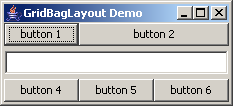
Sample 1, before resizing.
Sample 1, after resizing.
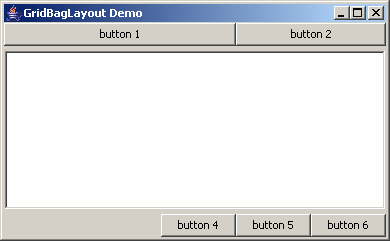
Code for Sample 1.
alias gridbagdemo {
  $frame = frame("GridBagLayout Demo", 'center=1');
  $panel = panel($frame,'layout=gridbag');

  # First row, 2 buttons
  $gbcon1 = constr('row=0', 'column=0', 'weightx=0.8', 'fill=horizontal');
  $gbcon2 = constr('row=0', 'column=1', 'colspan=2', 'fill=horizontal');

  # Second row, 1 textarea, spans 3 columns
  $gbcon3 = constr('row=1', 'column=0', 'colspan=3',
                   'weightx=1.0', 'weighty=1.0',
                   'fill=both', 'insets=5 1 5 1');

  # Third row, 3 buttons
  $gbcon4 = constr('row=2', 'column=0', 'anchor=right');
  $gbcon5 = constr('row=2', 'column=1');
  $gbcon6 = constr('row=2', 'column=2');

  add($panel, button('button 1'), $gbcon1);
  add($panel, button('button 2'), $gbcon2);
  add($panel, textarea('')      , $gbcon3);
  add($panel, button('button 4'), $gbcon4);
  add($panel, button('button 5'), $gbcon5);
  add($panel, button('button 6'), $gbcon6);

  pack($frame);
  show($frame);
}
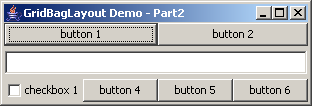
Sample 2, before resizing.
Sample 2, after resizing.
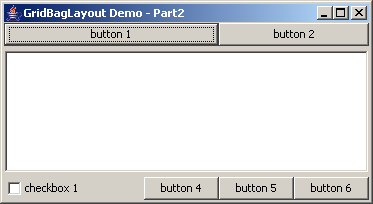
Code for sample 2.
alias gridbagdemo2 {
  $frame = frame("GridBagLayout Demo - Part2", 'center=1');
  $panel = panel($frame,'layout=gridbag');

  # First row, 2 buttons
  $b1 = constr('row=0', 'column=0', 'colspan=2', 'weightx=0.8', 'fill=horizontal');
  $b2 = constr('row=0', 'column=2', 'colspan=2', 'fill=horizontal');

  # Second row, 1 textarea, spans 4 columns
  $t1 = constr('row=1', 'column=0', 'colspan=4',
               'weightx=1.0', 'weighty=1.0',
               'fill=both', 'insets=5 1 5 1');

  # Third row, 1 checkbox, 3 buttons
  $c1 = constr('row=2', 'column=0');
  $b4 = constr('row=2', 'column=1', 'anchor=right');
  $b5 = constr('row=2', 'column=2');
  $b6 = constr('row=2', 'column=3');

  add($panel, button('button 1'), $b1);
  add($panel, button('button 2'), $b2);
  add($panel, textarea('')      , $t1);
  add($panel, checkbox('checkbox 1'), $c1);
  add($panel, button('button 4'), $b4);
  add($panel, button('button 5'), $b5);
  add($panel, button('button 6'), $b6);

  pack($frame);
  show($frame);
}
constr() refers to constraints. This dictates location of components in the frame, and their behaviour when the frame is resized.
Basically, using GridBag would look like this:
$container = panel('layout=gridbag');
$some_widget_constraints = constr(insert properties and values);
add($container, $some_widget, $some_widget_constraints);
| GridBagLayout constraints properties | |
| row (or gridy) | Value starts from 0 which means 1st row. 1 is 2nd row, and so on.. (Default is 0). Specifies row location of component. This value and column value MUST always be explicitly specified, otherwise components will overlap each other or may not be visible. |
| column (or gridx) | Value starts from 0 (Default is 0). Specifies column location of component. |
| rowspan (or gridheight) | Value starts from 1 (Default value is 1). Specifies how many rows should the component occupy. Similar to HTML table's rowspan property. |
| colspan (or gridwidth) | Value starts from 1 (Default value is 1). Same as rowspan but for columns. Similar to HTML table's colspan property. |
| weightx | Values range from 0.0 to 1.0 (Default is 0.0). Specifying a value greater than 1.0 has the same effect as specifying 1.0. This dictates how much should the component grow (if used with fill property) or move (if used with anchor property) horizontally. Example scenario: If there are two buttons in the same row and one button has 0.2 weightx, and the other has a value of 0.8, the first button will take up 20% of the horizontal space, and the other will take up 80% of the extra space -- but only if both buttons' fill values are not set to NONE. (This extra space becomes available when frames are resized). A weightx value of 0.0 means that the component will not be resized or repositioned/moved. If all the components have a 0.0 weightx, their natural tendency is to 'clump' together in the center of the frame when the frame is resized. |
| weighty | Same as weightx but for vertical movement and/or resizing. |
| fill | Values are NONE, VERTICAL, HORIZONTAL or BOTH. Refers to the 'direction' where the component should 'stretch' when its frame is resized. NONE means do not resize. VERTICAL means grow or resize the component vertically only - the width of the component stays the same. BOTH means grow or resize vertically and horizontally. |
| anchor | Values are TOPLEFT, TOPCENTER, TOPRIGHT, LEFT, CENTER, RIGHT, BOTTOMLEFT, BOTTOMCENTER, and BOTTOMRIGHT. Refers to where the component will "stick" itself when the frame is resized. Basically, each component have their own extra space. See image below for clearer idea on these regions: 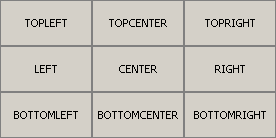 |
| insets | Refers to padding (in pixels) around the component. Syntax is insets=T L B R where T L B R stands for top, left, bottom, and right. Example, specifying insets=2 3 4 5 means insert 2px padding on top of widget, 3px on its left side, 4px below it, and 5px to its right side. |
| ipadx | Values are in pixels. Think of this as "initial padding x". This will be additional horizontal padding to a widget when you call pack(). For example, if a list() has a ipady value of 200, when the frame is first opened, that list() will have a width of around 200 pixels (not less than). |
| ipady | Same as ipadx, but for vertical padding. |