Containers Layouts Widgets
- button
- checkbox
- combo
- label
- list
- menubar
- radiobutton
- splitpane
- table
- textfield
- textarea
- toolbar
- tree
Widgets -> menubar
It is possible for frames to have a menubar. The images below show examples of menus.
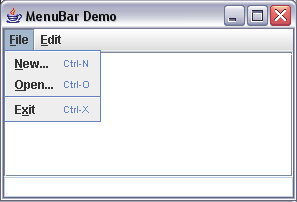
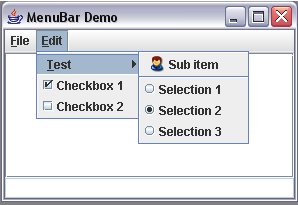
The following are steps to create a menubar:
- Create a scalar variable calling the menubar() subroutine. For example: $myMenu = menubar();
- We then set this scalar as the menubar of an existing frame. Let's say we already have a frame called $myFrame, we use the menubarSet() routine like this: menubarSet($myFrame, $myMenu);
- Then create categories or headers using menu(). In the image above, it is the "File" and "Edit".
- Add the headers to the menubar, which in the first example is $myMenu.
- Then create menu items and add them to the headers.
If we work backwards, we're actually creating menu items, adding them to their headers/categories, and the headers/categories are added to the menubar.
The following code generated the above images:
alias menudemo {
  $frame = frame("MenuBar Demo", 'center=1');
  $Menu = menubar();
  menubarSet($frame, $Menu);

  $mFile = menu("&File");
  $mEdit = menu("&Edit");

  menuAdd($Menu, $mFile);
  menuAdd($Menu, $mEdit);

  # File..
  $new  = menuItem("&New...\tCtrl+N", &NewMenu);
  $open = menuItem("&Open...\tCtrl+O", &OpenMenu);
  $exit = menuItem("E&xit\tCtrl+X", &ExitMenu);
  menuAdd($mFile, $new);
  menuAdd($mFile, $open);
  menuAdd($mFile, "-");
  menuAdd($mFile, $exit);

  # Edit
  $submenu = menu("&Test");
  $tmpicon = "gui/icons/admin.gif";
  menuAdd($submenu, menuItem("Sub item", $tmpicon, &subItemTest));
  menuAdd($submenu, "-");
  # Create a group of radio buttons
    $radio_a = menuItemRadio("Selection 1");
    $radio_b = menuItemRadio("Selection 2");
    $radio_c = menuItemRadio("Selection 3");
    # Always add to a buttongroup() Same with radiobutton()
    $group = buttongroup($radio_a, $radio_b, $radio_c);
    menuAdd($submenu, $radio_a);
    menuAdd($submenu, $radio_b);
    menuAdd($submenu, $radio_c);
  menuAdd($mEdit, $submenu);
  menuAdd($mEdit, menuItemCheck("Checkbox 1"));
  menuAdd($mEdit, menuItemCheck("Checkbox 2"));

  # Add contents to frame
  $panel = panel($frame, 'layout=Border');
  add($panel, textarea(""), 'area=CENTER');
  add($panel, textfield('', 'state=0'), 'area=BOTTOM');

  pack($frame);
  show($frame);
}

sub NewMenu { echo("New item"); }
sub OpenMenu { echo("Open item"); }
sub ExitMenu { close($frame); }
sub subItemTest { echo("Sub item selected"); }
Functions
| menubar() | Creates a menubar. Example: $yourMenu = menubar(); |
| menubarSet(frame, menubar) | Sets menubar as the menubar for an existing frame. Example: menubarSet($yourFrame, $yourMenu); |
| menu(string) | Creates a main menu category or item. The character preceded by an ampersand (&) will become the mnemonic. Example: $menuTools = menu("&Tools"); |
| menuItem(string [,icon , &subroutine] ) menuItemRadio() menuItemCheck() |
These create menu items. The syntax for all three is the same.
The string parameter is very important because the shortcut keys are immediately added there. For example, if you have "Play a song\tCtrl+S" item, the Ctrl+S is the shortcut. Notice that the string "Play a song" and Ctrl+S are separated by \t or a tabspace. However you MUST bind the shortcut keys for them to actually work. See the jircii documentation on how to bind keys. The character preceded by the ampersand (&) will be the mnemonic. |
| menuAdd(category, item) | This adds a menu item to a category. This also adds a category to a menubar. If the item to be added is a single dash "-", then a menu separator will be inserted. |