Containers Layouts Widgets
- button
- checkbox
- combo
- label
- list
- menubar
- radiobutton
- splitpane
- table
- textfield
- textarea
- toolbar
- tree
Layouts -> Null Layout or Absolute Positioning
Null Layout or absolute positioning allows you to dictate where exactly a widget goes by specifying its bounds. However, the widgets will not "move" or reposition themselves when its container is resized. Thus, using null layout is useful mostly if your frame or dialog is not resizable. The image below is an example using this layout:
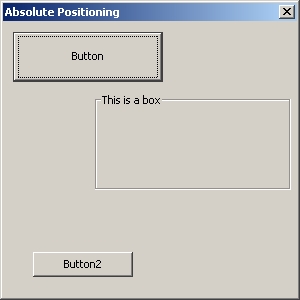
The code that generated the above dialog is:
alias nolayout {
  $f = dialog($null, 'title=Absolute Positioning', 'size=300 300');
  $p = panel($f);
  $b = button('Button', 'bounds=10 10 150 50');
  $x = boxpanel('bounds=90 70 200 100', 'title=This is a box');
  $c = button('Button2', 'bounds=30 230 100 25');
  add($p, $b);
  add($p, $x);
  add($p, $c);
  show($f);
}
Syntax
To use absolute positioning, there is no need to set any property to a panel (as seen above). What is more important is that the 'bounds' of the widgets are specified. The syntax for specifying the bounds is:
$var = widgetname(args, 'bounds=x y w h');
The widgetname refers to an actual widget: a button, list, panel, etc. The x y w h values are in pixels. x refers to the position of the widget from the left side of its container, y means the position from the top, w means width, and h is the height.
Thus, to create a button that is located 13 pixels from the left of a container, and 20 pixels from the top, with a width of 200 pixels and height of 324, the following snippet is used:
$mybutton = button('Text for button', 'bounds=13 20 200 324');
When using null layout, ALL of the 'xywh' values MUST be specified.
Be careful when using absolute positioning. If a widget overlaps with another widget, one of them will not be visible.
- End of page -