Containers Layouts Widgets
- button
- checkbox
- combo
- label
- list
- menubar
- radiobutton
- splitpane
- table
- textfield
- textarea
- toolbar
- tree
Layouts -> BorderLayout
BorderLayout divides a container into five (5) areas: TOP, LEFT, CENTER, RIGHT, and BOTTOM. The area is specified when a widget is added to its container.
The frame below shows five buttons added in each of the areas.
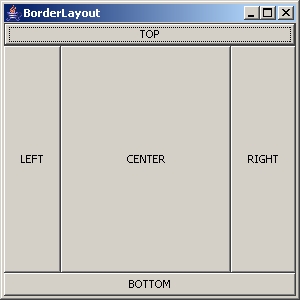
The alias for the image above is as below.
alias borderlayout {
   $borderframe = frame('BorderLayout', 'size=30 30 300 300');
   $mainpanel   = panel($borderframe, 'layout=BorderLayout');

   $top    = button('TOP');
   $left   = button('LEFT');
   $center = button('CENTER');
   $right  = button('RIGHT');
   $bottom = button('BOTTOM');

   addWidget($mainpanel, $top   , 'area=TOP');
   addWidget($mainpanel, $left  , 'area=LEFT');
   addWidget($mainpanel, $center, 'area=CENTER');
   addWidget($mainpanel, $right , 'area=RIGHT');
   addWidget($mainpanel, $bottom, 'area=BOTTOM');

   show($borderframe);
}
When the frame (or the container) is resized, the components in each area will stretch as much as necessary to fill all the available space of that area.
It is not necessary that all the areas are used. A container may have only a TOP and CENTER areas, for instance. The image below shows an example of a frame with only three areas.
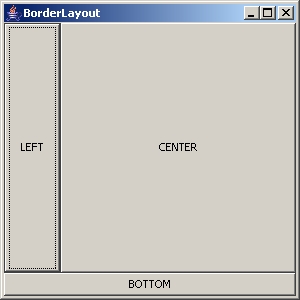
Syntax
To use BorderLayout, any of the following can be used:
$p = panel('layout=Border hgap vgap');
$p = panel('layout=BorderLayout hgap vgap');
The hgap and vgap respectively refers to horizontal gap and vertical gap between the widgets. These values are in pixels.
An example that uses horizontal and vertical gaps would be:
$p = panel('layout=border 3 5');
The above sets a border layout to panel $p with 3 pixels horizontal gap and 5 pixels vertical gap. If a horizontal gap is specified, the vertical gap must also be specified.
- End of page -