
 ChassisMain BoardCentral Processing UnitRandom Access MemoryVideoAudioHard Disk DriveOptical Disk DriveInput DevicesOutput DevicesPower Supply UnitAdditional Hardware
Software
Operating SystemApplication SoftwareMaintenance SoftwareRAM (Random Access Memory) comes in several types separated by their speed and pins. ECC RAMs are for servers while non-ECC RAMs work with wide range of PCs from desktops to laptops. Higher speed means more bandwidth. More space means better multitasking. It is as simple as that. These are basic types of RAMs and speed:
- 168-pin SDRAM (66MHz, 100MHz, 133MHz)
- 184-pin DDR SDRAM (266MHz, 333MHz, 400MHz)
- 240-pin DDR2 SDRAM (533MHz, 667MHz, 800MHz & above)
Normally, RAM speed is assigned to special codename whereby:
- PC2100 (266MHz)
- PC3200 (400MHz)
- PC4200 (533MHz)
- PC5300 (667MHz)
- PC6400 (800MHz)
- PC8500 (1066MHz)
The direction of the RAM to be installed can be confirmed by the notch shown as the circle in Step 1. Hold by the edges and carefully align the RAM module before inserting it into the RAM slot. Insert the module in sequence starting from first socket. As usual, do no apply excessive force. Once inserted, the lock would be automatically secured.
For Dual Channel RAM installation, install each RAM module into the first socket of each pair. RAM modules with identical speed, capacity and latency are recommended for running Dual Channel Mode.
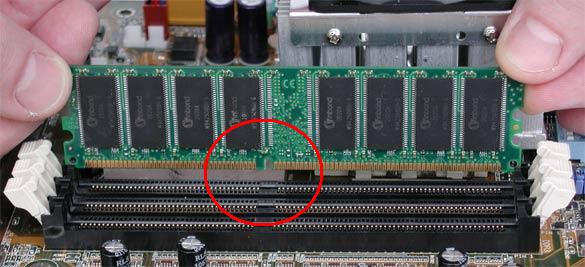
Click to enlarge
Step 1
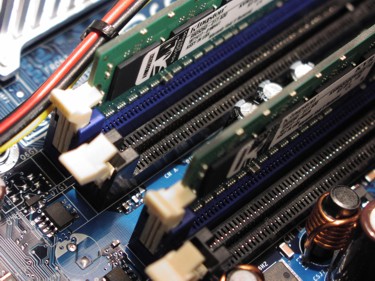
Click to enlarge
Step 2
Once done, your progress so far should be similar to the illustration in Step 3. Replace the completed main board tray back to the chassis.
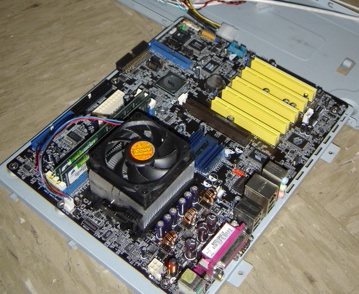
Click to enlarge
Step 3
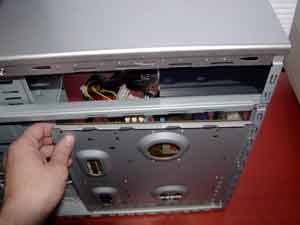
Click to enlarge
Step 4
 Back
Back

©2006 CHC Team