
 ChassisMain BoardCentral Processing UnitRandom Access MemoryVideoAudioHard Disk DriveOptical Disk DriveInput DevicesOutput DevicesPower Supply UnitAdditional Hardware
Software
Operating SystemApplication SoftwareMaintenance SoftwareInput devices consist of mouse, keyboard, webcam, microphone, scanner and many other hardware which transfer data into the system. USB (Universal Serial Bus) interface is most widely used in these peripherals.
PS/2 Interface for Keyboard
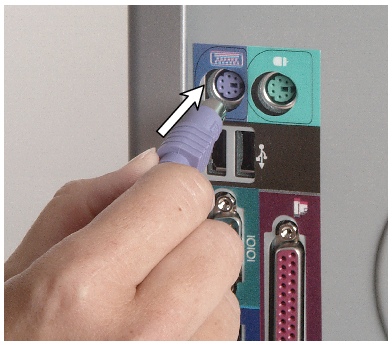
Click to enlarge
Step 1
Connect the end of the keyboard cable to the purple PS/2 port on the rear panel.
PS/2 Interface for Mouse
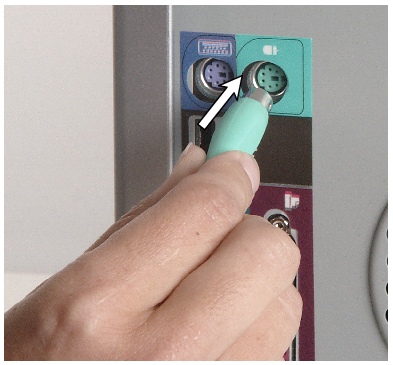
Click to enlarge
Step 2
Connect the end of the keyboard cable to the green PS/2 port on the rear panel.
USB Interface for Wide Range of Devices
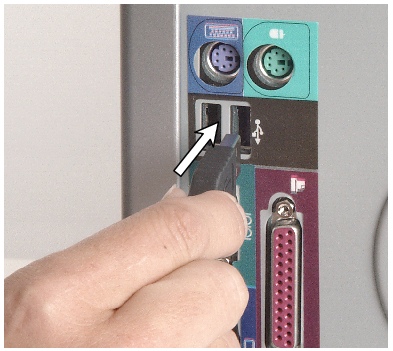
Click to enlarge
Step 3
Connect the end of the device cable to any USB ports on the rear panel.
Audio Input for Microphone
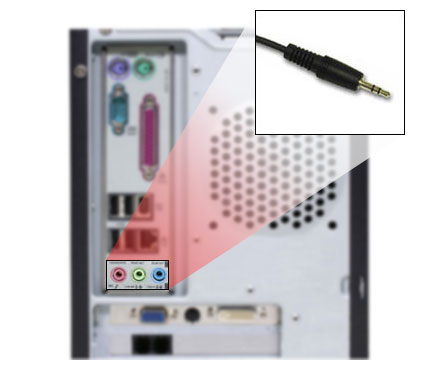
Click to enlarge
Step 4
Connect the end of the microphone cable to the pink audio jack on the rear panel or sound card.
 Back
Back
©2006 CHC Team