
 ChassisMain BoardCentral Processing UnitRandom Access MemoryVideoAudioHard Disk DriveOptical Disk DriveInput DevicesOutput DevicesPower Supply UnitAdditional Hardware
Software
Operating SystemApplication SoftwareMaintenance SoftwareCPUs are classified by socket types similar to main boards.
Intel CPUs:
- Socket 370 (Celeron, Pentium II, Pentium III)
- Socket 478 (Celeron, Pentium 4)
- Socket 775 (Celeron, Celeron D,Pentium 4, Pentium D, Core 2 Duo)
AMD CPUs:
- Socket 462 (Athlon XP, Sempron)
- Socket 754 (Sempron, Athlon 64, Turion 64)
- Socket 939 (Sempron, Athlon 64, Athlon 64 X2, Athlon 64 FX)
- Socket AM2 (Sempron, Athlon 64, Athlon 64 X2, Athlon 64 FX)
Insert the CPU into the main board CPU socket perpendicular to the surface with caution. Make sure the notch matches that of the CPU socket. Do not use excessive force. Secure the lever.

Click to enlarge
Step 1

Click to enlarge
Step 2
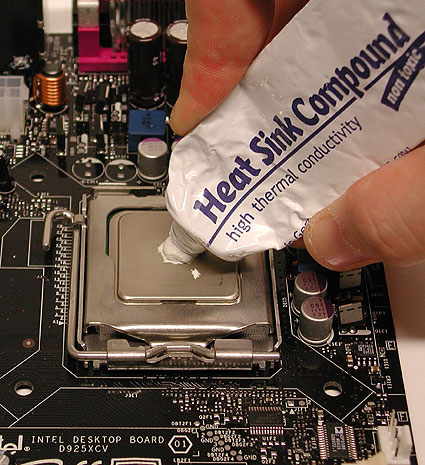
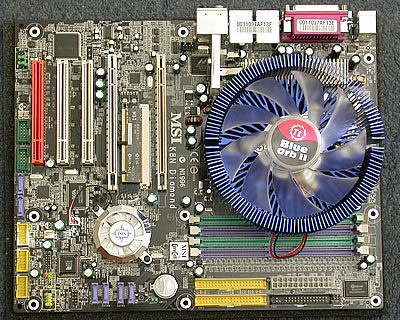
Apply some even layer of thermal paste on the CPU. Carefully place the CPU cooling fan above the CPU and secure it. The illustration shows a universal Thermaltake Blue Orb II which fits into any socket. Remember to connect the power connector.
Click to enlarge
Step 3
Click to enlarge
Step 4
 Back
Back

©2006 CHC Team