gis 520 portfolio
advanced geospatial analysis - spring 2014

Editorial Staff:
Steven Mohr - [email protected]
RALEIGH, THURSDAY, APRIL 24, 2014
"All the News
That's Fit to Print"
Linear Referencing
Problem
This assignment was designed to provide a basic knowledge of the linear referencing technology in GIS. A road/route in maps is generally drawn graphically as a line. However, this does not easily allow for the extensive segmentation of these routes due to variations in speed, number of lanes, type of pavement, etc. that each of these roads have. By not being able to describe a road in more specific terms, this greatly reduces the effect GIS can have on information gathering in regards to it. Linear referencing, on the other hand, provides a more three dimensional solution for this problem.
Analysis Procedures
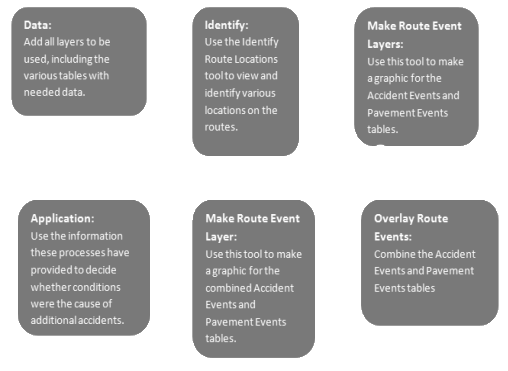
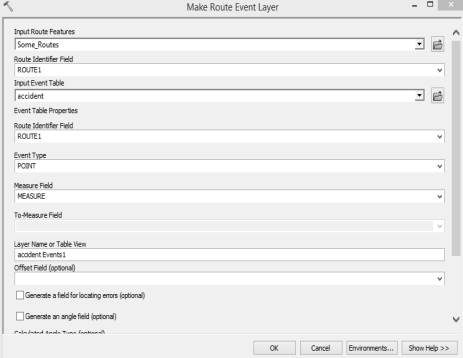
Strategies: In order to complete this assignment, two tools within ArcMap were vital. This first was the Identify Route Locations tool. This allowed me to pick any location along any route, and see the metadata for that segment. This is useful when you have a graphic display and you need to know certain information about a particular section you’re looking at (e.g. speed). The next tool I used was completely vital to this project: the Make Route Event Layer tool. This tool was able to take data from the tables I used in this assignment and turn them into layers. Using needed data like that provided in the Accident.dbf table and Pavement.dbf table, I was able to turn them into graphic layers and pinpoint the information I need. This was done using the Overlay Route Events tool. This project also needed the graphic and tabular data from the Pitt County roads and routes geodatabase.
Methods: To accomplish what was needed for this project, the user had to know how to pinpoint the pertinent data and perform the proper functions with it. The best way to pinpoint that data is through the use of Select by Attribute, Field Calculator, and other SQL tools. After using these to find the needed data, other tools such as Make Route Event Layer were used to gain the exact numbers sought.
Application & Reflection
Problem description: A small town is looking to compare the number of traffic tickets given out to drivers on a certain thoroughfare. They want to see the variances in these numbers based on the speed limit for that segment of the road.
Data needed: To find the data they seek, there are a few pieces of information they would need to start with. The small town would need to have a data table listing all the traffic tickets given out on this road (by segment), they would need a data table that shows the speed limit in various sections, and they would need a graphical data projection.
Analysis procedures: Using the Make Route Event Layer tool, they would make a graphical layer for both of the data tables supplied in this project, and they would combine these files using the Overlay Route Events. After that, with all of this data in the same graphics and tables, simple SQL expressions can be used to find the answers sought by this small town. They will be able to tie the number of tickets to the various segments and their particular speed limits. This will allow them to analyze and judge the usefulness of these areas.
Additional Assignment Reflection
Tools like those used in this assignment are part of why GIS has and is continuing to revolutionize government census data. In the past, a road could only be classified in a few ways: by local name, route number, district, etc. That’s different now. GIS has provided tools that allow for much greater segmentation of a road or any other line based on whatever data you have for it: speed limit, pavement type, weather pattern area, or many many other ways (depending on the information you have for it). Coming into GIS, I didn’t see the applicability nearly as much as I see it now.
Results
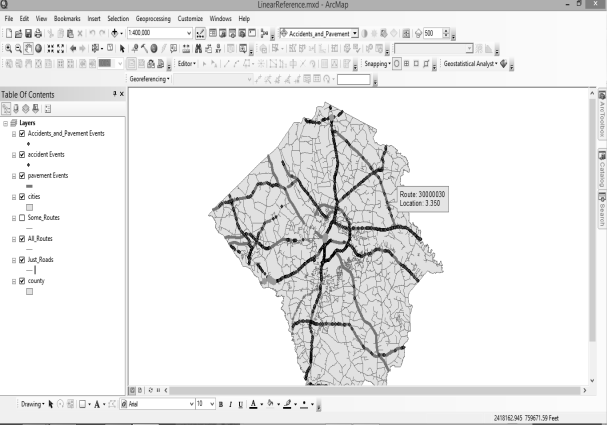
This screen shot shows the roads and routes of Wake County, NC.
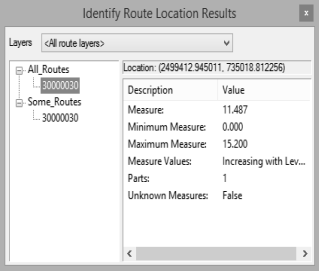
This screen shot shows a particular point along a route being identified.
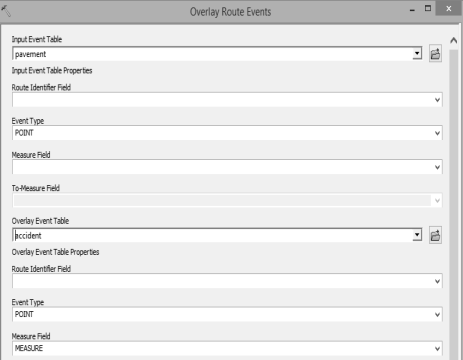
This screen shot shows the Overlay Route Events tool being applied.
This screen shot shows the Make Route Event Layer tool being applied.
World News

Local Traffic
Environmental News
Regional Weather