gis 520 portfolio
advanced geospatial analysis - spring 2014

Editorial Staff:
Steven Mohr - [email protected]
RALEIGH, THURSDAY, APRIL 24, 2014
"All the News
That's Fit to Print"
AutoCAD Integreation
Problem
In this assignment, it was my job to develop a geodatabase that contained a number of specific feature classes. This database would be used for the future management of campus buildings and related facilities. The biggest challenge in this was that the files I was given to construct this database were CAD files, a system of files used by a different package of software. That means these Masterplan files were not georeferenced and could be in very different displays once imported into ArcMaps.
Analysis Procedures
Strategies: In order to solve a problem such as this, the analyst must have an ArcGIS license and software package (preferably ArcGIS 10.1 or newer), this analyst must have the rudimentary tools to work with, such as the CAD Masterplan given in the assignment. Using these CAD files, the ArcGIS software must include tools such as Feature Class to Feature Class, which allows the analyst to take these files and turn them into features that a geodatabase can incorporate. In order to understand the procedures involved in this process, I first read all of the information provided and watched the videos that went along with, and then I went completed the process using the appropriate technology.
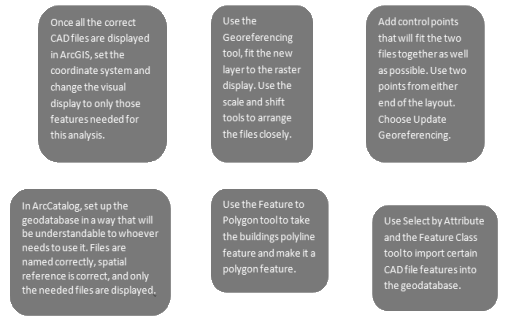
Methods: To design a geodatabase that was useable and complete, in this analysis I used several tools such as the Feature Class to Feature Class tool and the Georeferencing tool. To do this, there were several steps that needed to be taken.
Application & Reflection
Problem description: Learning how to use various types of data files within ArcGIS technology is a useful thing. There are many software programs that have GIS type functions and files. It is a very useful thing to be able to migrate these files back and forth. I have been told there is a PDF type that allows for layers that can be used in ArcGIS. This option makes it easy for contractors and city planners to get blueprints back and forth.
Data needed: For this to work, however, the user would need the proper software and licenses require of Adobe and ArcGIS. The skills and access to these things is not something everyone has. However, most of the city data layers that could be used can be found from county and city websites.
Analysis procedures: In order to understand the procedures and practices of using layered PDF files and migrating to and fro from ArcMaps, I would do the same thing I did with the CAD files: look for information on the internet and everywhere else I could find it.
Additional Assignment Reflection
People who work in the electronic information technology field know all about the difficulty of transferring data from one software suite to another. Having been a public librarian who worked heavily with databases, I have felt the frustration of proprietary software limitations many times. The fact that ArcMap has tools that were developed for specific data transfers—data transfers that require very precise manipulations—is such a large benefit to the users. It saves so many headaches.
Results
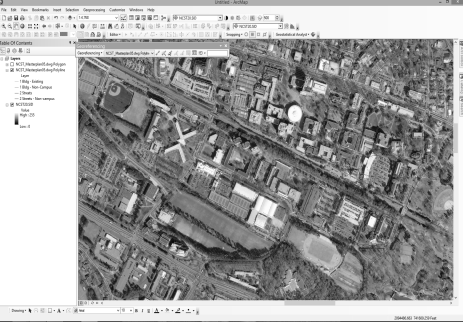
This screen shot shows the Georeferencing process taking place.
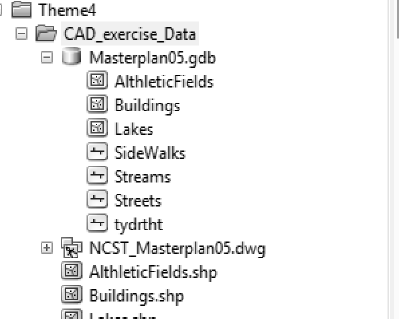
This screen shot shows the Geodatabase developed in the project.
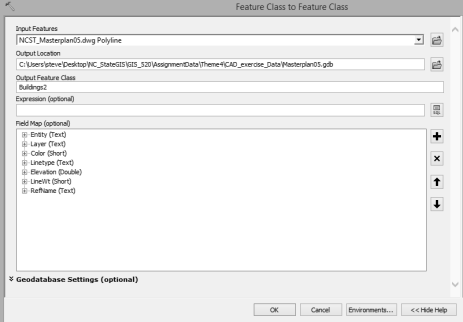
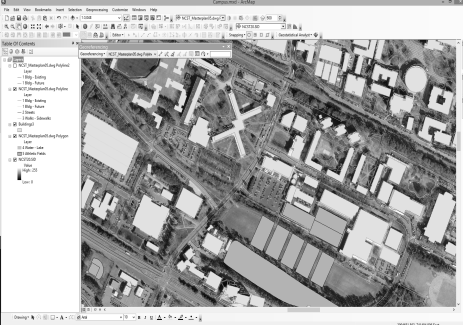
This screen shot shows the migration of CAD files to Geodatabase features.
This screen shot shows the final product of the Georeferencing and Feature to Polygon proceses.
World News

Local Traffic
Environmental News
Regional Weather