|
|
5
|
Working with your Animation
|
|
In This Section:
|
Windows >
Information > Anim
Stats
|
Using the Anim Stats Window
|
|
|
|
|
The Anim Stats window displays the number of animation-related attributes for selected DAG nodes.
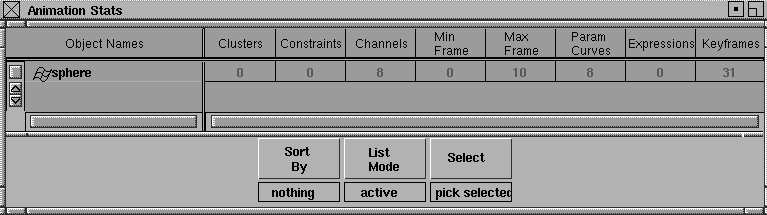
These following attributes are included in the window's columns:
Object Names
-
- DAG node name. Edit it by double-clicking on the field.
Clusters
-
- Number of clusters affecting the node or geometry below the node.
Constraints
-
- Number of constraints affecting the node.
|
|
For example, if only the
node's rotations are
animated, channels would
be 3 (X, Y, and Z).
|
Channels
-
- Number of node attributes that are animated.
Min Frame
-
- Earliest keyframe, if there is any keyframed animation. If there isn't, the value is 0.
Max Frame
-
- Latest keyframe, if there is any keyframed animation. If there isn't, the value is 0.
|
|
For example, if translate,
rotate, and scale were
animated, and a new
timewarp created, Param
Curves would be 10 curves
(we don't count the
timewarp for every channel).
|
Param Curves
-
- Number of parameter curves that are directly animating this node. Note that instanced curves are only counted once.
Expressions
-
- Number of expressions that directly animate the node.
|
|
As with Param Curves,
keyframes on instanced
curves are only counted
once.
|
Keyframes
-
- Total number of keyframes in the curves that animate this node.
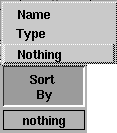
Sort By Menu
|
|
|
Nothing
-
- Shows the nodes in DAG order, with the DAG type icon.
Type
-
- Sorts the nodes by type, with the DAG type icon.
Name
-
- Sorts by name (doesn't show the DAG type icon).
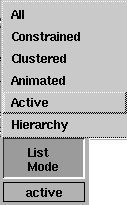
List Mode Menu
|
|
|
All
-
- Shows all nodes in the system.
Constrained
-
- Show all constrained nodes.
Clustered
-
- Shows all nodes that are directly clustered; that is, the node that you see as a cluster member in the cluster editor.
Animated
-
- Shows all animated nodes.
Active
-
- Shows active nodes.
Hierarchy
-
- Shows active nodes and all nodes below them.
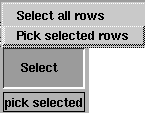
Select Menu
|
|
|
Select all rows
-
- Highlights all rows in the window
Pick selected rows
-
- Does a model-pick on the nodes in the selected rows. If nodes on the same branch are highlighted, the highest node is picked.
|
Windows >
Information > Scene
Info
|
Using the Scene Info Window
|
|
|
|
|
The Scene Info window has five sections: Clusters, Sets, IK, Anim, and Geometry. These sections display all attributes for the specified file.
Clusters
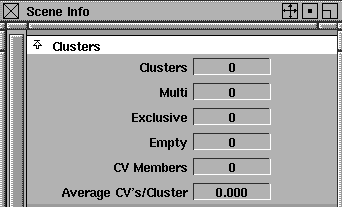
Clusters
-
- The total number of clusters in the scene.
Multi
-
- The number of multi-clusters in the scene.
Exclusive
-
- The number of exclusive clusters in the scene.
Empty
-
- The number of empty clusters in the scene.
|
|
For example, if a plane with
16 CVs was in 2 multi-
clusters, then 32 CV
memberships would be
reported. This is a better
indicator of the complexity
of the model and the amount
of work spent in cluster
transforms.
|
CV Members
-
- The sum of the number of CVs affected by each cluster, as opposed to the total number of CVs affected by one or more clusters.
Average CVs/Cluster
-
- Average number of CVs per cluster.
Sets
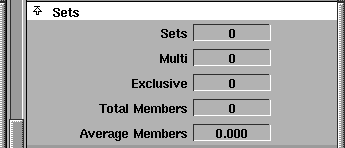
Sets
-
- The total number of sets in the scene.
Multi
-
- The number of multi-sets in the scene.
Exclusive
-
- The number of exclusive sets in the scene.
|
|
For example, a sphere that's
in 2 sets counts as 2
members.
|
Total Members
-
- The number of set members, as opposed to the number of objects in 1 or more sets.
Average Members
-
- The average number of members per set.
IK
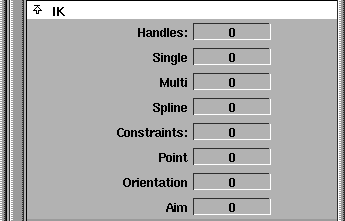
Handles
-
- The total number of IK handles in the scene.
Multi
-
- The number of multi-chain IK handles in the scene.
Single
-
- The number of single-chain IK handles in the scene.
Spline
-
- The number of spline IK handles in the scene.
>
|
Note:
|
If a chain has both a root and a master handle it counts as two
handles.
|
Constraints
-
- The total number of constraints in the scene.
Point
-
- The number of point constraints.
Orientation
-
- The number of orientation constraints.
Aim
-
- The number of aim constraints.
Anim
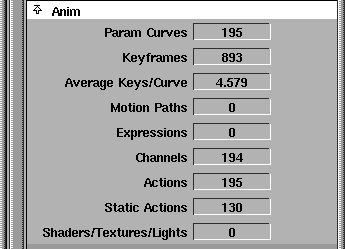
Param Curves
-
- Total number of param curves in the scene.
Keyframes
-
- The total number of keyframes on all the param curves.
Average Keys/Curve
-
- The average number of keys per curve.
Motion Paths
-
- The total number of motion paths in use.
Expressions
-
- The total number of expressions in the scene.
Channels
-
- The total number of animatable attributes that are actually animated.
Actions
-
- The total number of actions.
Static Actions
-
- The total number of static actions.
Shaders/Textures/Lights
-
- The total number of shaders, textures, and lights (that is, entities accessible from the multi-lister) that have one or more animated parameters.
Geometry
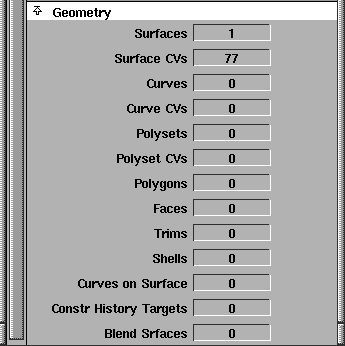
Surfaces
-
- The total number of NURBS surfaces in the model.
Surface CVs
-
- The total number of surface CVs, including overlapping CVs, for closed surfaces.
Curves
-
- The total number of curves in the model.
Curve CVs
-
- The total number of curve CVs.
Polysets
-
- The total number of polysets in the model.
Polyset CVs
-
- The total number of polyset vertices.
Polygons
-
- The total number of polygons in all polysets.
Faces
-
- The total number of faces in the model.
Trims
-
- The total number of trim surfaces in the model, not counting those currently inside shells.
Shells
-
- The total number of shells in the model.
Curves on Surface
-
- The total number of curves-on-surface in the model.
Construction History Targets
-
- The total number of construction history targets in the model.
Blend Surfaces
-
- The total number of blend surfaces in the model.
|


