Utilities |
|
||||||||||||||||||||||
15 |
Utilities |
In this Section:
Utilities Menu Summary |
|||||||||||||||||||||
|
| |||||||||||||||||||||||
The Utilities menu provides miscellaneous tools to control your Alias interface, use UNIX shells, or use complementary applications.
| |||||||||||||||||||||||
|
Utilities > UNIX shell |
Accessing the UNIX Shell | ||||||||||||||||||||||
|
| |||||||||||||||||||||||
Displays a new UNIX shell on top of existing Alias windows. How to UseSelect Utilities > UNIX shell. The UNIX shell window is displayed. | |||||||||||||||||||||||

| |||||||||||||||||||||||
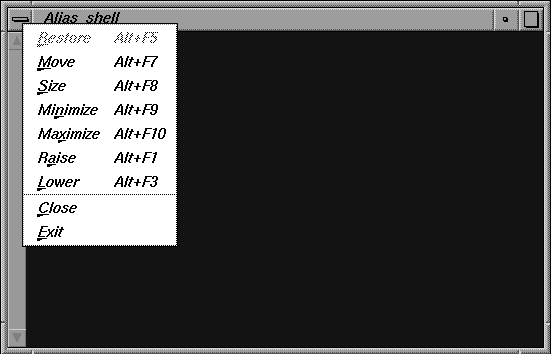
Click and hold the bar icon at the top left corner of the title bar to see the UNIX Shell window menu.
You can perform functions on the UNIX Shell window by selecting a menu item. For example, click Close to close the window. >
| |||||||||||||||||||||||
|
Utilities > Minimize |
Minimizing the Alias Interface | ||||||||||||||||||||||
|
| |||||||||||||||||||||||
You can stow Alias windows and all associated control windows as one icon. How to UseSelect Utilities > Minimize. All Alias windows are removed and are replaced by one icon on your screen. That is, the main Alias window, the tool Palette, the Shelves, and any control windows you may have open are all removed from the screen. This function works almost the same way as the Xwindow Stow button located at the top right of the Alias window frame. However, the Xwindow Stow button minimizes only the main Alias window. To redisplay the Alias windows, use the Xwindow Restore button, or click on the stowed icon. >
| |||||||||||||||||||||||
|
Utilities > Lower Utilities > Raise |
Sending Alias Windows to the Back | ||||||||||||||||||||||
|
| |||||||||||||||||||||||
To place the Alias window at the bottom of the stack of windows currently open on the console, select Utilities > Lower. To bring the Alias windows back to the front, select Utilities > Raise. The Alias windows are placed at the top of the stack of windows currently open on the console. Notes
| |||||||||||||||||||||||
| Copyright © 1998, Alias|Wavefront, a division of Silicon Graphics Limited. All rights reserved. | Please send questions or comments regarding the documentation to: [email protected] |