|
Purpose
Prints an Alias format image.
How to Use
To print Alias .pix image file to postscript printer
-
1
-
To open the Custom Print program options, in the Alias Preferences box (Preferences > User options > Alias Preferences), under Printer Options, choose CUSTOM as the Print application. This sets the filter program to convert a .pix image to postscript format.
-
2
-
Set the Program path to alias_printPS. The script alias_printPS converts a .pix image file to postscript format. This is a one time setup and does not have to be repeated every time.
-
3
-
Follow the general steps below to print the file.
To print SGI's RGB image file
-
1
-
In the Alias Preferences box (Preferences > User options > Alias Preferences), under Printer Options, choose SGI Impressario as the Print application.
>
|
Note:
|
SGI Impressario is only available on SGI platforms.
|
-
2
-
Follow the general steps below to print the file.
General steps to print a file
-
1
-
Select File > Output > Print.
The File Requestor is displayed.
|
|
-
2
-
Click the Show List button to open the File Lister.
-
3
-
Click on the filename or icon of the file you want to print. The filename and its path appear in the File Requestor.
-
4
-
Click the Print File button.
-
Alternatively, type a name and/or a path from scratch
without selecting anything in the File Lister
.
>
|
Note:
|
If you experience problems, ensure that fromalias and
toalias are installed in your usr/sbin directory. These
components are on your system CD, and are required for
Alias peripherals.
|
-
5
-
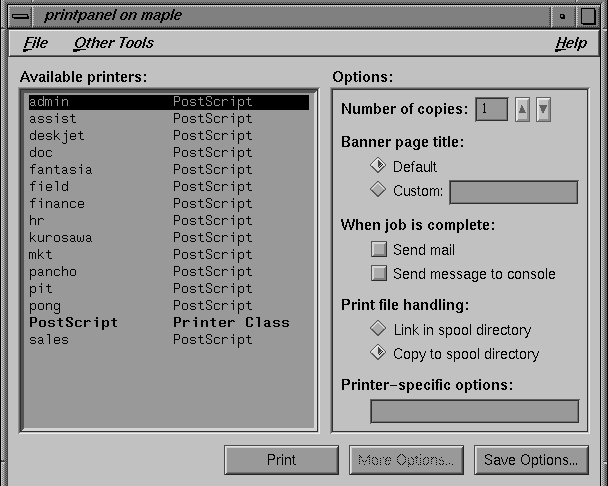
A print panel window is displayed for the selected printer on the selected machine.
-
6
-
Select the options you want, then click Print to print the file. You can also click Save Options to save the options you set for future print runs, or More Options to display a wider selection of print options.
Making a print request outside of Alias
At the UNIX prompt, type:
alias_print <Alias format image>
For example, the following prints a pix file called rosetex:
alias_print user_data/demo/pix/rosetex
|


