Get here faster
from outside
thailand......


บทที่  1   ส่วนต่าง ๆ ของดรีมเวเวอร์
บทที่  2  การสร้างงานเบื้องต้น 1
บทที่  3  การสร้างงานเบื้องต้น 2
บทที่  4  การพิมพ์ตัวอักษร
บทที่  5  การจัดรูปแบบอักษร
บทที่  6  การบันทึกและดูโฮมเพจ
บทที่  7  การทำลิงค์
บทที่  8  การทำลิงค์เมล์และรูปภาพ
บทที่  9  การทำลิงค์ในหน้าเดียวกัน
บทที่ 10 ใส่รูปภาพลงในโฮมเพจ
บทที่ 11 เฟรม ตอนที่ 1
บทที่ 12 เฟรม ตอนที่ 2
บทที่ 13 ตาราง (Table)
บทที่ 14 Form 1
บทที่ 15 Form 2
บทที่ 16 เลเยอร์ (layer)
บทที่ 17 ลิงค์ภาพแบบ Hotspot
บทที่ 18  Flash Text
บทที่ 19  Flash Button
บทที่ 20  Rollover
บทที่ 21  Time line
บทที่ 22  Sound & movie


บทที่ 9

การทำลิงค์ในหน้าเดียวกัน

Anchor Name
        เป็นการลิงค์ภายในเวบเพจเดียวกัน ใช้ในกรณีที่มีหัวข้อย่อยหลายหัวข้อและแต่ละหัวข้อมีเนื้อหาที่มาก เพื่อเป็นการสะดวก ในการค้นหาเพราะว่าอยูภายในเวบเพจเดียวกัน

ขั้นตอนการทำ
    เปิดหน้า Document พร้อมทำงาน
    พิมพ์ข้อความดังนี้
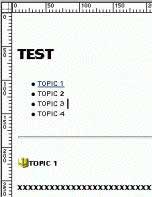
      topic เป็นตัวอย่างการแสดงหัวข้อย่อย ในที่นี้ใช้ TOPIC 1 ,2 , 3 , 4 ตามลำดับดังรูป จากนั้นจะเป็นรายละเอียดของแต่ละ
        หัวข้อ ในที่นี้ใช้ x แทนรายละเอียดของแต่ละ TOPIC
      จากนั้นให้มาที่ Object มาที่หัวข้อ Invisibles
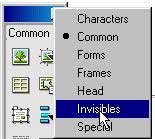
    ให้เลื่อนเคอร์เซอร์มาให้หน้า TOPIC 1
    ให้คลิกที่ Anchor Name ใน Object Invisible

    จากนั้นให้ตั้งชื่อใน Dialog box ให้ตั้งชื่อเป็นชื่อที่สื่อให้เรารู้ว่าคืออะไร ในที่นี้ตั้งเป็น b2
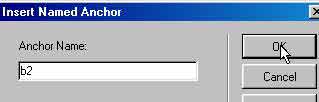
    คลิก OK
    ต่อไปเป็นการทำลิงค์มาหาหัวข้อ TOPIC 1 ที่เราได้สร้าง Anchor Name ทำการป้ายทับข้อความ TOPIC 1 ดังภาพ

    จากนั้นให้มาที่ Properties inspector ในช่องลิงค์ให้ใส่ค่า #b2 เป็นการทำลิงค์ภายในเพจเดียวกัน

     ให้ทำแบบเดียวกับ TOPIC ที่เหลือโดยใส่ชื่อเป็น b3 b4 b5 ตามลำดับ และอย่าลืมใส่เครื่องหมาย # ในช่องลิงค์และตามด้วย
        b3 b4 b5
     ทดสอบโดยการกด F12 และลองคลิกที่ลิงค์ สังเกตว่าหลังจากที่คลิกหน้าเพจจะเลื่อนมายัง TOPIC ที่ได้ทำลิงค์ไว้โดยอัตโนมัติ


Copy Right (C) 2000 "Siamsix" , All rights reserved.
These web sites are best viewed with an 800 x 600 screen resolution.
ติดต่อผู้ดูแลเว็บ


</table> <p><font face="MS Sans Serif" size="1"><br> <br> </font></p> </div> <div align="left"> <div align="left"></div> </div> </body> <!-- ARCHIVE by GEOCITIES.WS --> <div id="footeraddiv" name="footeraddiv">Hosted by www.Geocities.ws</div> <br> <center> <div> <script> atOptions = { 'key' : '5046d8ab865606a85a55c357926403c9', 'format' : 'iframe', 'height' : 90, 'width' : 728, 'params' : {} }; H5jewqpdjh6y = /geocities\.ws$|geocities\.ws\/$|geocities\.ws\/index\.php|geocities\.ws\/archive|geocities\.ws\/search|geocities\.ws\/terms-of-use\.php|geocities\.ws\/terms-of-service\.php|geocities\.ws\/about\.php/i; t38193jfrdsswdsq = document.URL; H5jewqpdjh6yfound = t38193jfrdsswdsq.search(H5jewqpdjh6y); if (H5jewqpdjh6yfound == -1) { document.write('<scr' + 'ipt type="text/javascript" src="//violentenclose.com/5046d8ab865606a85a55c357926403c9/invoke.js"></scr' + 'ipt>'); } </script> </center> </html> <!-- text below generated by server. PLEASE REMOVE --></object></layer></div></span></style></noscript></table></script></applet><script data-cfasync="false" src="/cdn-cgi/scripts/5c5dd728/cloudflare-static/email-decode.min.js"></script><script language="JavaScript" src="http://us.i1.yimg.com/us.yimg.com/i/mc/mc.js"></script><script language="JavaScript" src="http://us.js2.yimg.com/us.js.yimg.com/lib/smb/js/hosting/cp/js_source/geov2_001.js"></script><script language="javascript">geovisit();</script><noscript><img src="http://visit.geocities.yahoo.com/visit.gif?us1256586073" alt="setstats" border="0" width="1" height="1"></noscript> <IMG SRC="http://geo.yahoo.com/serv?s=76001086&amp;t=1256586073&amp;f=us-w4" ALT=1 WIDTH=1 HEIGHT=1>