Wireless IP
Introduction
What if field workers of a public utility had
online access to inventory databases, work orders,
maps and other essential information from
anywhere? What if crew chiefs had access to e-mail
and schedules without having to return to their
offices? This is the vision that the City of
Seattle Public Utilities is making a reality in a
project spearheaded by its Information Technology
Division. This case study shows not only the
issues the utility has faced and the solutions it
has found; but, more importantly, how the lessons
learned can be applied by almost any organization
today to make wireless data an effective and
successful tool.
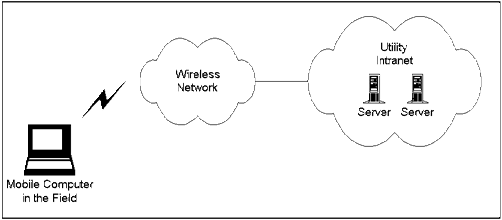
Figure 1: The utility
plans to make applications
and information on its intranet available to
field workers.
The applications the utility is extending to
its mobile workers include both work management
and office applications, a combination common to
many organizations. Developing wireless
networking solutions requires special
considerations. The utility has identified
effective approaches, is about to proceed with a
pilot program, and has a plan that accommodates
the inevitable changes in applications, platforms
and wireless technologies.
The utility's work and inventory management
application is MAXIMO*, a system that uses an
Oracle database, developed by PSDI (Bedford, MA, http://www.psdi.com/).
Since MAXIMO is developed for specific types of
job functions, it can be considered a vertical
market-type application. From the point-of-view
of providing wireless access to an enterprise
database, however, it is similar to any number of
other applications based on SQL (Structured Query
Language), one of the most common protocols used
today for client/server applications.
The office-based applications that the utility
intends to extend to the field include Novell's
GroupWise* and Web-hosted applications on the
utility's intranet. These are horizontal market
applications in that their use is not restricted
to any particular job function or type of
industry. In addition, the utility plans to make
a GIS (graphical information system) available
eventually, though it realizes that current
wireless networks are not well-suited for such
intensive graphical content. The goal for all
these applications is to provide reliable remote
operation with preferably the same user interface
as a direct LAN connection. Though slower
response times are acceptable and somewhat
inevitable, applications must operate in a
reliable and effective manner.
The utility has two types of remote workers
who will use the wireless system: leads that will
use MAXIMO primarily and crew chiefs that will
use the office applications in addition to MAXIMO.
Because it is difficult to predict what
applications may be needed in the future, a key
goal is to provide a flexible wireless
architecture that allows new applications to be
added easily.
Another goal is security. Wireless connections
should be no less secure than existing remote
access methods based on dial-up connections.
Finally, while the utility is willing to commit
to a particular wireless technology in its
initial deployment, it wants an approach that
allows it to migrate easily to other wireless
technologies in the future.
The utility recently adopted the Microsoft
Windows* 95 platform across multiple departments.
For the wireless IP project, it needed to decide
whether to use Windows 95 notebook computers or
to consider a somewhat more specialized platform
such as Windows CE.
Though MAXIMO client software is not available
for Windows CE, Windows CE was an option because
Syclo Corporation (Barrington, Illinois) supplies
middleware that enables Windows CE computers to
access MAXIMO databases through a gateway. Using
Windows CE would have provided advantages such as
lower device cost, greater portability and longer
battery life.
Despite some of the advantages of Windows CE,
the utility was concerned about the range of
applications it could deploy on the platform.
Because the utility expects the requirements for
mobile workers to evolve over time, and for the
types of work performed in the field to expand,
it needs the greatest degree of flexibility
possible for the types of applications it can
deploy. For this overwhelming reason, the utility
chose Windows 95 over Windows CE. In addition,
because the computers are mounted in the vehicles
and not used outside the vehicles, the extra
portability Windows CE was not a factor. Finally,
there are a number of ruggedized laptops
available that can address the demanding field
conditions that utility workers encounter.
The utility faced a bewildering situation when
it began evaluating the wireless networks
available. There was the analog cellular network,
new digital cellular and PCS technologies, and
four wireless packet networks with service in the
Seattle area.
The utility decided to base their applications
on TCP/IP communications, so this quickly
disqualified the BellSouth Wireless Data and
ARDIS networks which do not directly support TCP/IP.
Moreover, the utility believed that a packet-based
approach would better support the frequent
communications that workers in the field require.
This requirement eliminated circuit-switched
cellular connections. Since packet-based services
are not yet available for digital PCS networks,
the remaining choices were CDPD and the Metricom
Ricochet* network. CDPD and Metricom Ricochet*
are both IP-based packet networks. However, data
services for GSM and CDMA digital PCS networks
are expected to be deployed in the 1999 time
frame and so may be candidates in the future.
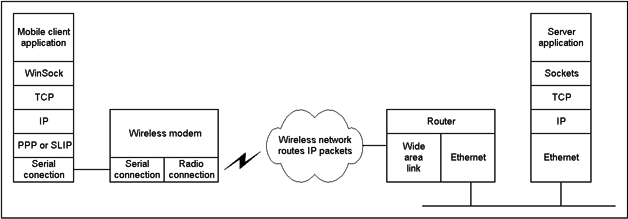
Figure 2: The utility chose
a wireless network
that is IP-packet based for greatest flexibility.
Since wireless data services are evolving
rapidly, the utility decided to implement an
architecture that insulates its applications from
the actual network used to the maximum extent
possible. Using an IP-based approach, where
applications make no assumptions about the nature
of the physical connection, achieves this goal.
This is not unlike Internet-based communications,
where packets may flow across copper cable, one
moment; fiber optic cable, the next; and a
satellite. It should be possible to deploy
applications using one wireless network; and with
minimal effort, migrate the application to
another wireless network in the future, should
that network become more desirable.
Migrating between network types is indeed
possible, though some adjustments may be
necessary for each network. For example, CDPD
uses fixed IP addresses and Metricom Ricochet
uses dynamically assigned addresses. This
difference could affect how firewalls are
configured. The effective throughput rates of
Ricochet and CDPD also differ, with Ricochet
operating at 20 to 30 Kbps and CDPD at about 10
Kbps.
In an ideal world, a computer connected over a
wireless network would work just like a computer
on a LAN. But wireless networks operate at lower
speeds with higher latency, and connections can
be lost at any moment, especially when mobile.
The utility has considered a number of software
approaches, seeking to strike a balance among
these factors: ease of use, performance,
reliability, and cost of deployment. To
complicate matters, it discovered that the best
approach for supporting one application is not
always the best approach for another.
The first approach is to use all applications
in their native form, with client software
installed on the mobile computer and
communicating using TCP/IP protocols. Because
some workers will be working with the same
applications both in an office environment and in
the field, the advantage of this approach is that
the user interface stays the same in both
environments. Also, IT managers can set up mobile
computers in the same way as desktop computers. A
disadvantage is that this approach does not
address some of the connectivity issues
associated with wireless, such as throughput and
latency. Another disadvantage is the requirement
for software installation on field computers,
which can add to maintenance and support.
Another approach is to use Citrix MetaFrame* (combined
with Microsoft Terminal Server), where
applications run on an application server at a
central location, and mobile nodes operate as
terminals (thin clients). The utility has already
deployed Citrix MetaFrame to support dial-up
users. The advantage of this approach is that
installing and maintaining mobile computers is
simplified because they only need the Citrix
client software to access multiple applications.
The disadvantage is that Citrix MetaFrame has
some significant limitations when operating over
wide area wireless connections. We learn about
these limitations in the next section when we
look at test results.
The third approach is to use wireless
middleware (specialized software installed on a
mobile computer and on a centralized server that
acts as an intermediary between client
applications and server processes) to optimize
communications. The utility has looked at
wireless middleware designed specifically for
MAXIMO, as well as general purpose middleware
that optimizes IP communications over wireless
links. The advantage of wireless middleware is it
allows applications to run with much better
response times and much greater reliability,
however, it increases complexity and adds cost.
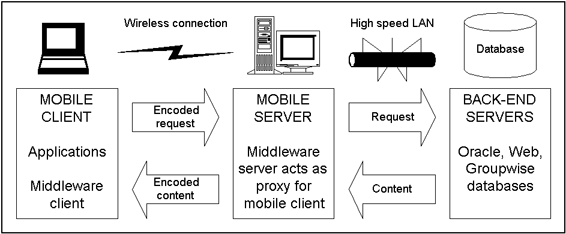
Figure 3: Wireless
middleware adds a mobile server that
handles transactions on behalf of the mobile
client.
Because wireless coverage is not always
available everywhere the workers spend time, an
approach also considered was Oracle Lite where
workers can download a subset of the database
they need, operate on it locally during the day,
and then synchronize at the end of the day. This
approach reduces the demand for wireless
connectivity, but it is not as flexible as the
other approaches where field workers remain in
constant communications during the day and can
respond quickly to changing circumstances.
By using a flexible computing platform such as
Windows 95 on a laptop, the utility realized it
could also consider a mix of approaches. Perhaps
one application would work best in its native
form, and another would work best using a thin-client
approach. This indeed was the case as we see next.
Whereas architecting different wireless
approaches on paper may be an entertaining
diversion, it is difficult to predict how the
approaches will actually perform until tested in
the real world. The utility has tested the
architectures discussed earlier with results that
did not always match expectations. For instance,
the utility expected that an IP-based client
would perform reasonably well over a wireless IP
connection. This was the case for certain
applications but not for others, which performed
better using a different approach. Testing
emphasized three scenarios:
- Given the
slower speed of wireless connections,
what are the issues when starting (and
restarting) sessions and applications?
- How do
applications perform once started, under
normal operating conditions?
- What happens
when a connection is lost due to driving
outside a coverage area or to strong
interference?
Interestingly, every application and every
software approach performed somewhat differently
under the three different test scenarios.
Here are the various configurations and how
they performed.
Remote IP-based Clients
The first configuration tested was with remote
clients, specifically MAXIMO and Web browser
clients installed on laptops using TCP/IP
communications. The version of GroupWise used at
the time did not provide a TCP/IP client, so
GroupWise could not be tested using this
configuration.
Because both Metricom Ricochet and CDPD are
based on IP, the applications operate in the same
fashion as if installed on LAN-based workstations
using TCP/IP protocol stacks. What is different,
of course, is the slower speed of wireless
connections. Also, the mobile nodes are not
necessarily always in wireless coverage. The
first comprehensive series of tests used the
Metricom Ricochet network. Compared to CDPD,
Ricochet has higher average throughput but it
does not support seamless hand-offs between base
stations. This means that active applications may
lose their connections when the vehicle drives
out of range of the original base station.
In looking at the first test scenario (how
applications started), Web applications
experienced no problems. But MAXIMO would
sometimes require more than five minutes during
the logon process. Subsequent research revealed
that because MAXIMO is an Oracle database
application, large data dictionaries are
downloaded at startup. This is clearly not
acceptable in a field environment. Fortunately,
it is possible to cache local versions of these
dictionaries on a local hard disk. Such up-front
synchronization is common to many applications
and is often a performance issue for wireless
communications.
Once connected (the second test scenario), the
Web client performed acceptably as long as the
content was more textual than graphical. MAXIMO,
in contrast, ran extremely slowly. Opening new
modules (e.g., the inventory module or the work-order
module) within MAXIMO would take 60 to 90 seconds.
Once a module opens, a screen update (such as
looking at a new order) would take about 30
seconds. It is easy to understand why operations
were so slow. Oracle transactions, based on SQL,
involve a considerable amount of back-and-forth
traffic. The slow screen updates make a remote
MAXIMO client practically unusable. However,
users entering text in either application posed
no problems.
The last operating scenario examined the
effect of lost connections. The Web client was
highly tolerant of intermittent connections,
which was expected since HTML applications are
stateless; each page entails a new TCP connection.
With MAXIMO running, a dropped connection would
generate an error message for transactions in
process and result in the module closing; but the
overall session is maintained. If no transactions
were in progress, MAXIMO readily tolerated the
underlying connection being lost and regained.
Citrix MetaFrame
The second software scenario tested was the
thin-client approach using Citrix MetaFrame.
Starting a remote MetaFrame session over a
wireless connection took about 60 seconds. Once
the session was started, application startup was
not an issue at all, which was expected since the
applications run on an application server that
has a high speed LAN connection to back-end
services. Screen updates for all applications
tested (MAXIMO, Web client and GroupWise) ranged
from 10 to 15 seconds. This was about the same
speed as a remote Web client but significantly
faster than a remote MAXIMO client.
The biggest problem with using MetaFrame,
however, is that it is not tolerant of
intermittent connections. Even in the absence of
any application processing, driving out of range
of the Metricom base station would terminate the
MetaFrame session as well as all the application
sessions. With this architecture, text input
proved very slow for all applications—not
surprising since every character typed by the
user would have to be echoed over the wireless
link by the application server.
Wireless Middleware
The last architecture tested was wireless
middleware. The particular middleware chosen for
testing was Smart IP* from Nettech Systems, Inc.
Smart IP has a number of different capabilities,
but the one of greatest interest is its ability
to make IP communications more efficient over
wireless networks. It achieves its efficiency
through a number of mechanisms, including
compression as well as replacing TCP with its own
wireless-optimized transport protocols. These
transport protocols are used over the wireless
connection between the middleware client software
that is installed on the mobile computer and the
mobile server as Figure 3 shows. The net result
is transmission of fewer and smaller packets.
Actual test results with Smart IP showed
noticeable data transfer gains. Using a browser
application, Smart IP reduced the time required
to download pages by an average of about 25%. For
example, a page that took 20 seconds to download
without Smart IP would on average take 15 seconds
with Smart IP. The utility tried to configure
Smart IP to operate directly with MAXIMO, but
tests were postponed due to configuration
difficulties.
The utility found that different applications
worked better using different approaches. Only
through testing could the utility determine how
their applications would function in a wireless
environment. Though applications generally ran
slower than over dial-up modem connections, with
the right approach, applications run well enough
to be deployed in the field. The utility also
found that the number of software approaches
available increased during the course of its
project.
Computer technology continues to evolve
rapidly, as software vendors keep revising and
improving their applications. The utility
experienced a number of changes that had
implications on their wireless strategy. In
particular, the number of software approaches
available to support wireless networking expanded.
The utility upgraded from GroupWise version 4.1
to version 5.2. With the older 4.1 version there
was no easy way to provide remote access other
than by using Citrix MetaFrame. But version 5.2
includes TCP/IP support as well as a Web browser
client thus adding two new paths for providing
remote wireless access. The most attractive
approach appears to be the TCP/IP client; testing
is under way to confirm this.
Another change involves PSDI, the maker of
MAXIMO. Realizing the importance of wireless
communications for field service workers, PSDI
began to architect their next generation of
software to better support wireless networking.
In the new version, MAXIMO offers a Web-based
interface to mobiles using HTML protocols. HTML
is a far more efficient approach than extending
the SQL database protocols all the way to the
mobile computer. This new "wireless friendly"
version of MAXIMO is release 4 and the utility
plans to upgrade from release 3. Once it does,
the Web interface to MAXIMO will probably be the
preferred approach for mobile field workers.
As the utility proceeds with its deployment,
and as it expands the number of field workers
using wireless networking, it will need to rely
on a hybrid set of approaches to address their
application needs. In some cases, the utility
will run applications in their normal LAN-based
or modem-based modes. In other cases, the utility
will take advantage of wireless middleware
products. And for other applications, a thin-client
software approach may be the most effective.
By using a strategy that includes an IP-based
communications infrastructure and a flexible
computing platform, combining the various
software approaches is completely feasible. Such
a strategy provides the utility, and any
organization for that matter, maximum flexibility
when supporting both field workers with specific
job functions and office workers with more
generalized computing needs.
|