Home
Tutorials
Exercises
About Us
Exercises
Exercise No.1
Exercise No.2
Exercise No.3
Exercise No.4
Exercise No.5
Exercise No.6
Exercise No.7
Exercise No.8
Exercise No.9
Exercise No.10
Procedure:
Open the application.
Open the file that you will edit.
Using quick selection tool, select the t-shirt.
Click "Image", the "adjustments", then "Hue and Saturation".
Click "colorize".
Choose the color you want.
Click "ok".
Save your file.
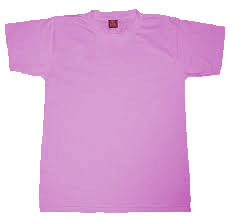
Use this image:
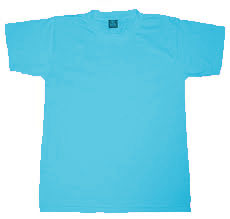
Final output: