Dynamics |
|
14 |
Dynamics |
Dynamics is a branch of physics that describes how objects move. Using dynamics, you can animate objects realistically by defining their physical properties and then creating forces which act upon them. For example, you can animate a ball falling and bouncing, or smoke rising and blowing in the wind, using dynamics. In This Section:Dynamics Overview |
|
| |
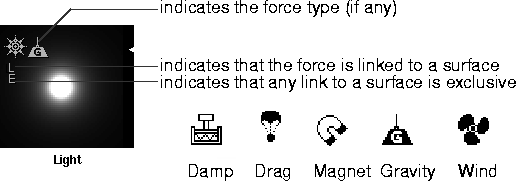
To use dynamics you must run a dynamic simulation. A dynamic simulation calculates how objects will react to forces, or to collisions with other objects, and automatically animates them with the appropriate motion. You can set up and run a dynamic simulation in the Run Dynamics window (see Running a Dynamics Simulation in the Animating in Alias book). ObjectsObjects are the things that move during a dynamic simulation. There are two types of objects that you can animate using dynamics: geometry objects and particles. Geometry ObjectsGeometry objects are surfaces that you have modeled. In order for a geometry object to be included in a dynamic simulation, it must be either passive or active. Active objects react to forces and collisions. Passive objects provide colliding surfaces for active objects, but they do not react to collisions or forces. You can make an object either passive or active in the Participating Objects section of the Run Dynamics window (see Participating Objects in the Animating in Alias book). An object's physical properties (density, elasticity, friction, and drag) will influence how it reacts to forces and collisions. You can define an object's physical properties in the Dynamics Properties section of the object's shader's Control Window (see Dynamics Properties on page 88). ParticlesParticles are collections of small pieces of geometry that can be emitted from a surface or light and animated using dynamic forces (see Particles on page 285). ForcesForces simulate natural phenomena like gravity, magnetism, wind, drag, and damping, and influence the motion of objects during a dynamic simulation. There are two types of forces: environment forces and force objects. Environment ForcesEnvironment forces (gravity, air density, and turbulence) are global forces which influence the motion of all objects during a dynamic simulation. You can set the environment forces in the Dynamics Globals section of the environment's Control Window (see Dynamics Globals on page 64). Force ObjectsForce objects (gravity, magnet, wind, drag, and damp) influence the motion of objects in a local area during a dynamic simulation. A force object is actually a light which has a force component (that is, the light's Force parameter is set to GRAVITY, MAGNET, WIND, DRAG, or DAMP). Any light can exert a force in addition to, or instead of, emitting light. If a light has a force component, a force icon will appear in the top left corner of the light's Multi-lister swatch.
You can link a force to an object (in the same manner you would link a light to an object), so that only that object is influenced by the force. You can set the force type by setting the Force parameter in the Active Effects section of the light's Control Window (see Force on page 239). You can set the strength of the force by setting the Force Intens. value in the Common Parameters section of the light's Control Window (see Force Intens. on page 244). | |
| Copyright © 1998, Alias|Wavefront, a division of Silicon Graphics Limited. All rights reserved. | Please send questions or comments regarding the documentation to: [email protected] |