|
Minolta
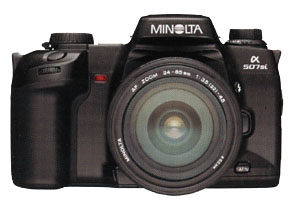
Alpha Dynax Maxxum 507si 600si 650si Classic Panorama Date Camera Check
List Page 08 v
2003-09-01 12:27
This CHECK LIST describes the quality of operation warranted by Minolta to general users. When inquiring about quality or camera inspection, refer to this CHECK LIST. Use this list also when checking operation before and after purchase or repair. Use the standard Minolta AF 50mm f/1.7 lens for the following checks except where other lenses are mentioned. |
|
Please browse and enjoy, offer feedback, and return often!
 Minolta
Alpha Dynax Maxxum 507si 600si 650si Classic Panorama Date Camera Minolta
Alpha Dynax Maxxum 507si 600si 650si Classic Panorama Date CameraCustomized Functions |
|
|
AF
Auto Focus Illuminator
|
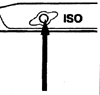
By pressing Film Speed and Flash Control Buttons simultaneously,
[On AL] or [OFF AL] appears and stays in Data Panel.
Pressing the Film-Speed Button will change the display: [On AL] = AF Auto Focus Illuminator is on, [OFF AL] = AF Auto Focus Illuminator is off. |
|
AEL
Auto Exposure Lock
|
By pressing the ISO Film Speed Button and the AEL Auto Exposure Lock
Button simultaneously, [On] or
[OFF] appears and stays in Body Data Panel.
Pressing the ISO Film Speed Button again will change the display: [On] Auto Exposure Lock is locked by pressing AEL Auto Exposure Lock Button once and unlocked by pressing the button again, [OFF] Auto Exposure Lock is locked only while AEL Auto Exposure Lock Button is pressed and held. |
|
Metering
Index
|
By pressing ISO Film Speed Button and Depth Of Field Preview Button
simultaneously, [On] or [OFF] appears and stays in the Body Data Panel.
Pressing the ISO Film Speed Button will change the display: [On] = Separate Metering Index pointer appears for amount of exposure compensation, [OFF] = Separate Metering Index pointer does not appear for amount of exposure compensation. |
|
Shutter
Release Lock
|
Remove
the lens first.
By sliding the Main Switch from LOCK to ON while pressing and holding the ISO Film Speed Button and the Lens Release Button simultaneously, [On] or [OFF] appears in Data Panel depending on the previous setting. Pressing the ISO Film Speed Button will change the display: [On] = Shutter can be released when film is loaded and no lens is attached. [OFF] = Shutter is locked when film is loaded and no lens is attached. |
|
Data
Panels LCD Elements Test
|
Set the Drive Mode Selector to Multiple Exposure.
Press and hold the ISO Film Speed Button while opening and closing the battery door. Check to confirm that all LCD Liquid Crystal Display elements are displayed and appear complete in the Body and Viewfinder Data Panels. Open and close the battery door to return the displays to normal. |
| Minolta
Alpha Dynax Maxxum 507si 600si 650si Classic Panorama Date Camera Interchangeable Focusing Screens |
|
 |
There
are three interchangeable viewfinder focusing screens available for
the Minolta 507si, 600si, and 650si cameras, here is an explanation
of the meaning of the part numbers:
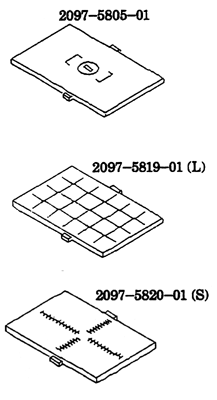
# 2097-xxxx-xx = Minolta 507si 600si and 650si camera model number # xxxx-58xx-01 = Interchangeable Focusing Screen number # xxxx-xx05-xx = Normal 2097-5805-01 # xxxx-xx19-xx (L) = Lines (grid) 2097-5819-01 (L) # xxxx-xx20-xx (S) = Scientific (measured) 2097-5820-01 (S) Although these screens CAN be interchanged in the field by the photographer, because they are soft plastic and easily damaged, and a tool may be required for easiest, damage free installation, Minolta recommends having a Minolta-authorized servicer perform the interchange. |
 Minolta
Alpha Dynax Maxxum 507si 600si 650si Classic Panorama Date Camera Minolta
Alpha Dynax Maxxum 507si 600si 650si Classic Panorama Date CameraDiopter Adjustment |
|||||||||||||||||||||||||||||||||||||||||||||||||||||||||||||||||||||||||
|
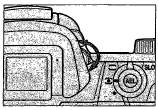
You
can easily set the viewfinder diopter correction without a lens on the
camera. Point the camera toward a bright light source and turn
the small diopter adjustment dial (next to the eyepiece) until the [ 0 ]
brackets etched on the viewing screen appear sharpest when looking through
the viewfinder.
Note: this has no effect on auto focusing accuracy, however, your manual focusing accuracy depends on accurate viewfinder diopter adjustment. The dial sets correction factors between +0.5 (clockwise rotation of the dial) and -2.5 diopters (anticlockwise rotation of the dial). Default is -1 diopter. Each step equals plus or minus 0.1875 Diopter
|
|||||||||||||||||||||||||||||||||||||||||||||||||||||||||||||||||||||||||
Home Beyond the Owners Manual Previous Page Page: 01 02 03 04 05 06 07 08 09 Next Page Notes
