|
Minolta
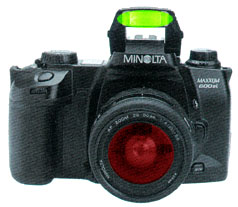
Alpha Dynax Maxxum 507si 600si 650si Classic Panorama Date Camera Check
List Page 06 v
2002-10-06 16:16
This CHECK LIST describes the quality of operation warranted by Minolta to general users. When inquiring about quality or camera inspection, refer to this CHECK LIST. Use this list also when checking operation before and after purchase or repair. Use the standard Minolta AF 50mm f/1.7 lens for the following checks except where other lenses are mentioned. |
|
Please browse and enjoy, offer feedback, and return often!
 Minolta
Alpha Dynax Maxxum 507si 600si 650si Classic Panorama Date Camera Minolta
Alpha Dynax Maxxum 507si 600si 650si Classic Panorama Date CameraFlash |
|
|
Flash
control
|
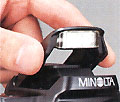
When the built-in pop-up flash is up or when a dedicated flash unit
is mounted directly on the camera and is on and charging,
the Flash On Indicator
 appears in viewfinder.
When flash charge is completed, the Flash Signal  or
or  (red-eye-reduction) appears in viewfinder.
After a flash burst, the Flash Signal
or
blinks in 2 Hz showing that
the flash is controlled correctly. |
|
P
Program Exposure mode flash (default)
|
Flash fires automatically for low light and back-lit conditions.
Flash always fires in flash bracketing mode or wireless/remote flash control mode. Flash does not fire for back lit in manual focus mode, centerweighted average or spot metering mode. Manual fill flash is available by pressing and holding Flash Control Button during shutter release. |
|
A
Aperture Priority, S Shutter Priority, M Manual Exposure mode flash
|
Flash always fires.
|
|
Wireless
flash mode
|
With a dedicated flash unit allowing wireless flash control attached,
sliding Flash Mode Selector to WIRELESS will set the flash unit to wireless
mode, and it's flash channel is set to the camera.
In wireless flash mode, each of the two Flash signals
blinks alternately in 2 Hz in
viewfinder.In wireless flash mode, pressing the AEL Auto Exposure Lock Button will make a test burst on the of-camera flash unit in wireless flash mode. In wireless flash mode, wireless ratio control is available by pressing the Flash Control Button during shutter release. Built in flash : Off camera flash unit = 1 : 2. |
|
Red-eye-reduction
flash mode
|
While the Flash Mode Selector is set to
 and the built-in pop-up flash is up, flash will fire several short
bursts just before the shutter release.
and the built-in pop-up flash is up, flash will fire several short
bursts just before the shutter release. |
|
HSS
High Speed Synchronization flash
|
High speed synchronization flash is available with the Minolta 5400HS
or equivalent accessory flash unit.
|
| Minolta
Alpha Dynax Maxxum 507si 600si 650si Classic Panorama Date Camera Flash controlled shutter speed |
|||
| Exposure Mode | Normal Flash | Wireless Flash | HSS High Speed Synchronization Flash |
| P
Program (default) A |
Shutter speed automatically set between 1/200 to 1/60 second. | Shutter speed automatically set to 1/60 second. | Shutter speed automatically set. |
| S M |
Shutter speed manually set to 1/200 second or slower. | Shutter speed manually set to 1/60 second or slower. | Shutter speed manually set. |
Home Beyond the Owners Manual Previous Page Page: 01 02 03 04 05 06 07 08 09 Next Page Notes
