|
Minolta
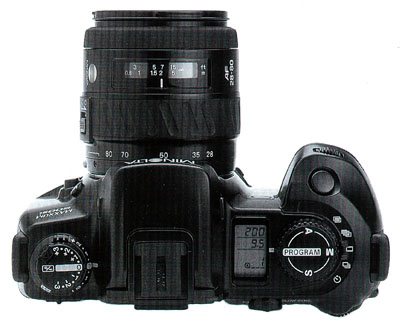
Alpha Dynax Maxxum 507si 600si 650si Classic Panorama Date Camera Check
List Page 03 v
2002-10-06 16:16
This CHECK LIST describes the quality of operation warranted by Minolta to general users. When inquiring about quality or camera inspection, refer to this CHECK LIST. Use this list also when checking operation before and after purchase or repair. Use the standard Minolta AF 50mm f/1.7 lens for the following checks except where other lenses are mentioned. |
 |
Please browse and enjoy, offer feedback, and return often!
 Minolta
Alpha Dynax Maxxum 507si 600si 650si Classic Panorama Date Camera Minolta
Alpha Dynax Maxxum 507si 600si 650si Classic Panorama Date CameraExposure Mode Controls and Operations |
|
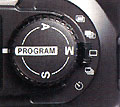
| A Aperture Priority Exposure mode |
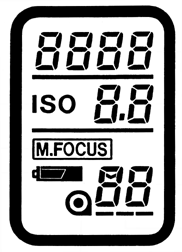
An attached automatic lens's Aperture display stays in the the Body Data
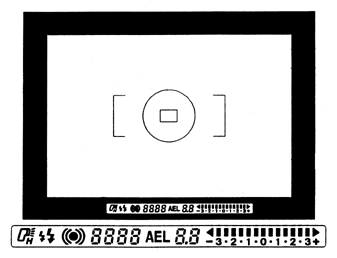
Panel. Turning either the Front or Rear Control Dial will change the aperture setting in 1/2-stop increments. By pressing the Shutter Release Button part way down, the camera's selection of optimum Shutter Speed appears in the Body and Viewfinder Data Panels. Shutter Speed is automatically set. |
| P Program Exposure mode (default) | By
pressing the Shutter Release Button part way down, the camera's selection
of optimum Shutter
Speed and attached automatic lens's Aperture appear in the Body and Viewfinder
Data Panels. The camera's Shutter Speed and an attached automatic lens's Aperture are automatically set. |
| S Shutter priority Exposure mode |
Shutter speed display stays in the Body Data Panel. Turning Front or Rear Control Dial will change the Shutter Speed setting in 1/2-stop increments. By pressing Shutter Release Button part way down, the optimum Aperture of an attached automatic lens appears in the Data Panels. Aperture of an attached automatic lens is automatically set. |
| M Manual Exposure mode |
Shutter Speed and an attached automatic lens's Aperture displays stay
in the Body Data Panel. Turning the Front Control Dial will change the camera's Shutter Speed setting in 1/2-stop increments. Turning the Rear Control Dial will change an attached automatic lens's Aperture setting in 1/2-stop increments. By pressing the Shutter Release Button part way down, the Metering Index appears in the Viewfinder Data Panel. The Metering Index shows difference between your exposure setting and the camera's camera metering. |
  Minolta
Alpha Dynax Maxxum 507si 600si 650si Classic Panorama Date Camera Minolta
Alpha Dynax Maxxum 507si 600si 650si Classic Panorama Date CameraViewfinder and Body Data Panel Indication for a Subject that is out of the Camera Metering System's AE Auto Exposure range |
||
|
Exposure
Mode |
Subject out of camera meter range | Subject out of camera control range |
|
P
Program Exposure mode (default)
|

Over and Under Exposure Arrows Blink on Metering Index in Viewfinder Display |
Shutter
Speed and Aperture Displays blink.
|
|
A
Aperture Priority Exposure mode
|
Shutter
Speed Display blink.
|
|
|
S
Shutter Priority Exposure mode
|
Aperture
Display blinks.
|
|
|
M
Manual Exposure mode
|
Displays
Manually selected Shutter Speed and attached automatic lens's Aperture
setting.
|
|
Home Beyond the Owners Manual Previous Page Page: 01 02 03 04 05 06 07 08 09 Next Page Notes
