|
Minolta
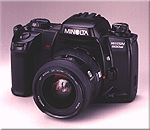
Alpha Dynax Maxxum 507si 600si 650si Classic Panorama Date Camera Check
List Page 07 v
Friday, April 18, 2003 6:22 PM
This CHECK LIST describes the quality of operation warranted by Minolta to general users. When inquiring about quality or camera inspection, refer to this CHECK LIST. Use this list also when checking operation before and after purchase or repair. Use the standard Minolta AF 50mm f/1.7 lens for the following checks except where other lenses are mentioned. |
|
Please browse and enjoy, offer feedback, and return often!
| Minolta
Alpha Dynax Maxxum 507si 600si 650si Classic Panorama Date Camera AF/M Auto Focus/Manual mode control Note: Only with a compatible auto focus lens attached |
|
|
AF/M
Auto Focus/Manual mode control
|
Pressing the Focus Mode Button will select AF Auto Focus or M Manual
focus.
|
|
AF
Auto Focus Focus mode (default)
|
Manual Focus Indicator disappears.
AF Auto Focus lens coupler is engaged, and lens is set to a specific focus position after an infinity reset. AF Auto Focus area - Turning AF Auto Focus Area Selector will select Wide or Spot Focus area. |
| M Manual Focus mode |
Manual Focus Indicator appears in Data Panel. AF Auto Focus lens coupler is disengaged. |
 Minolta
Alpha Dynax Maxxum 507si 600si 650si Classic Panorama Date Camera Minolta
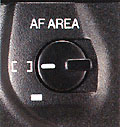
Alpha Dynax Maxxum 507si 600si 650si Classic Panorama Date CameraAF AREA Auto Focus Area Control |
||
|
[ ] Wide area Focus mode (default)
|
Focus is confirmed even for a subject at an edge of brackets (Wide Focus
Area) in the viewfinder.
|
|
|
|
Focus is confirmed only for a subject in Spot Focus Area in the
viewfinder.
|
|
  Minolta
Alpha Dynax Maxxum 507si 600si 650si Classic Panorama Date Camera Minolta
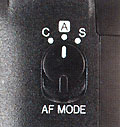
Alpha Dynax Maxxum 507si 600si 650si Classic Panorama Date CameraC A S AF MODE Continuous Automatic Single Auto Focus Mode control |
|
|
C
A S AF MODE
Continuous Automatic Single Auto Focus Mode control |
Turning the C A S AF MODE Auto Focus Mode Selector will select S Single
shot, A Auto, or C Continuous AF Auto Focus.
|
| C Continuous AF Auto Focus mode | Camera continues focusing a subject, and focus never be locked. |
|
A
Automatic selection AF Auto Focus mode (default)
|
For a still subject, focus is locked after confirmed. For a moving subject,
camera continues focusing the subject predicting its movements.
In continuous drive mode, continuous focus is selected on and after the second frame. |
|
S
Single shot AF Auto Focus mode
|
Focus is locked after confirmed.
|
 Minolta
Alpha Dynax Maxxum 507si 600si 650si Classic Panorama Date Camera Minolta
Alpha Dynax Maxxum 507si 600si 650si Classic Panorama Date CameraAF Auto Focus signals in Viewfinder Data Panel Note: Only with a compatible auto focus lens attached |
|
| In AF Auto Focus mode (default): | |
 Light constant
 |
Focus is locked. |
 Light constant
 |
Focus is confirmed (continuous focus). |
|
Light blinks |
Focus cannot be confirmed. |
| In M Manual focus mode: | |
| Light
constant |
Focus is confirmed. |
| Nothing | Focusing. |
|
Light blinks |
Focus cannot be confirmed. |
| Minolta
Alpha Dynax Maxxum 507si 600si 650si Classic Panorama Date Camera AF illuminator Note: Only with a compatible auto focus lens attached |
|
|
AF
Auto Focus Illuminator on (default)
|
In low contrast and low light condition, built-in flash fires a few
small
bursts to aid focus, or dedicated flash unit emits AF illuminator light.
No AF illuminator during the continuous AF mode. |
| AF Auto Focus Illuminator off | Press the ISO Film Speed Button and the Flash Control Button to toggle the AF Auto Focus Illuminator feature [On] or [Off]. |
 Minolta
Alpha Dynax Maxxum 507si 600si 650si Classic Panorama Date Camera Minolta
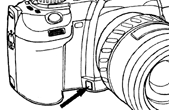
Alpha Dynax Maxxum 507si 600si 650si Classic Panorama Date CameraDepth Of Field Preview Note: Only with a compatible auto focus lens attached |
|
|
Depth
Of Field Preview
|
While pressing and holding the Depth Of Field Preview Button, the Aperture
of an attached automatic lens is stopped down to the set aperture.
The Aperture setting of an attached automatic lens cannot be changed while pressing and holding the Depth Of Field Preview Button. The Shutter release is available while pressing and holding the Depth Of Field Preview Button if focus is confirmed previously in AF Auto Focus mode. AF Auto Focus does not operate while pressing the Depth Of Field Preview Button. |
| Minolta
Alpha Dynax Maxxum 507si 600si 650si Classic Panorama Date Camera Panorama |
|
|
Panorama
|
By turning the Panorama Selector to panorama, the picture frame and
viewfinder are partially masked.
The data imprinting position changes for panorama frame. |
Home Beyond the Owners Manual Previous Page Page: 01 02 03 04 05 06 07 08 09 Next Page Notes
