

Tools & Effects
|
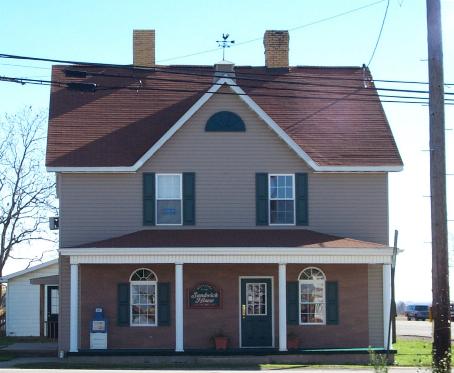
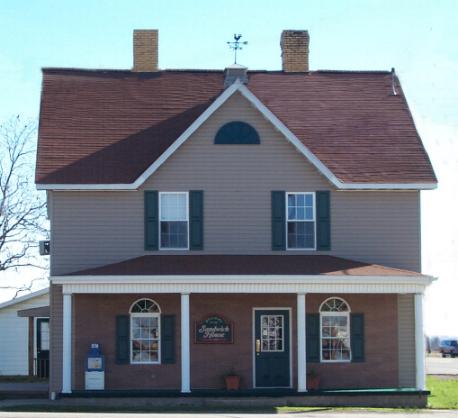
My work site. I do some graphics work for my boss which includes our
menu and I wanted a picture for the front cover. We are located on the
corner of an intersection in our small town, right on the main highway.
The power lines, poles and signs aren't very attractive.
|
The Sandwich House |
|
|
|
|
#1 |
|
|
|
So I *cloned my way out of them. It's time consuming, you have to be patient, remember to save often. *Clone A good tool for removing unwanted elements and "painting" in new elements. |
|
#2 |
|
|
Photo by Lila Kodak DC 290 Armstrong County, Pa. April, 2000 |
|
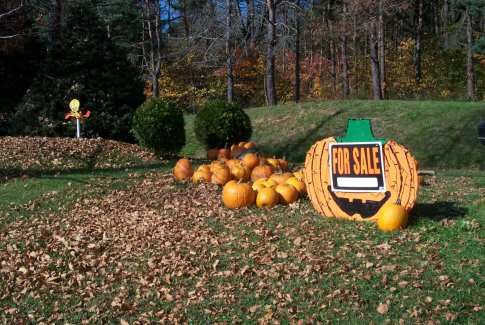
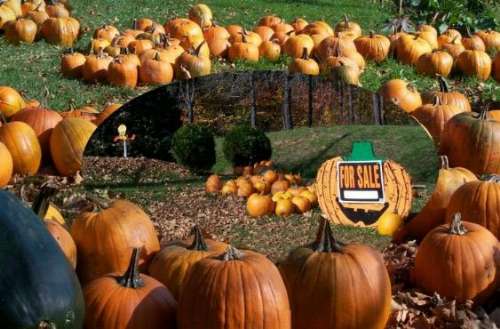
| I was putting together a fall album and thought these pumpkins for sale would be a nice addition. So I took #1 and #2 and put them together. |
Pumpkins 4 Sale |
 |
|
|
#1 |
|
|
I cropped #2 to get rid of the cars and zoom in on just the pumpkins. Then I made a selection of #1 in the shape of an eclipse, (love that Tweety bird!) I copied the selection to clipboard and pasted on my new #2, and saved them as a new image |
|
#2 |
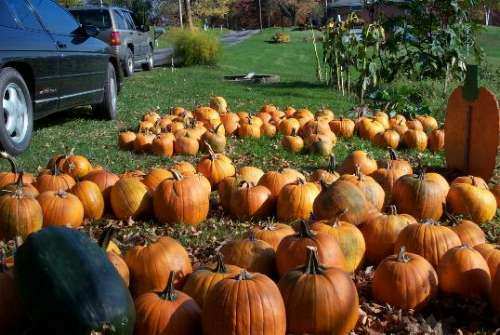
| Then, I opened the original #2 and my new image side by side in the photo program and cloned some pumpkins from #2 in front of new image to give the picture some depth, a 3D effect. #3 is the final picture. Pretty cool, eh? Pumpkins 4 Sale is one of my favorites. |
|
|
#3 |
|
|
Photos by Lila Kodak DC 290 Armstrong County, Pa. October, 2000 |
|
|
For More Tools and Effects Tips Check Out The Christmas Card Page |
TIP
|
Save your work often as you're making changes and don't forget to rename the picture* when making changes so you can go back to your original photo in case you totally screw up! :) *to rename the picture you want to select SAVE AS instead of SAVE |