|
Surface Texture Parameters
|
|
|
|
|
The Color Balance, Intensity, Blur, Effects, Surface Placement, and Label Mapping parameters are common to all surface textures.
Color Balance, Intensity, Blur, Effects
See Texture Parameters on page 101.
Surface Placement
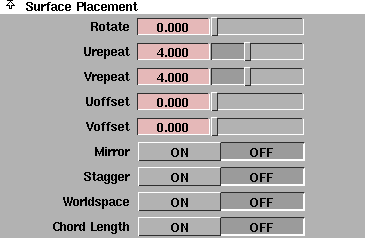
The Surface Placement parameters control how a texture's pattern covers the texture coverage area (the area the texture covers on the actual surface). See Label Mapping on page 128.
|
|
|
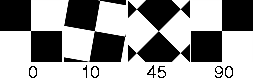
Rotate
-
- The angle (in degrees) the texture map is rotated on the surface. The slider range is 0 to 360. The default value is 0 (no rotation).
|
|
|
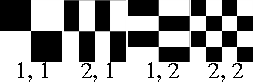
Urepeat, Vrepeat
-
- The number of times the texture is repeated within the coverage area along the surface's U and V parametric directions. If Urepeat value and/or Vrepeat value are greater than 1, the texture will be repeated several times within the coverage area, but the size of each instance of the texture will be smaller than the default size. Similarly, if the Urepeat value and/or the Vrepeat value are less than 1, only a portion of the texture will be mapped to the surface. The slider range is 1 to 10. The default value for most textures is 1.
|
|
|
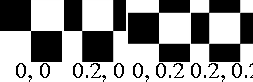
Uoffset, Voffset
-
- Offsets the texture pattern (without actually moving the texture itself) along the surface's U and V parametric directions. Adjust the Uoffset and Voffset values to fine-tune the placement of a pattern on a surface. The slider range is 0 (no offset) to 1. The default value is 0.
|
|
|
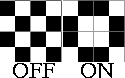
Mirror
-
- Mirrors repeated patterns of the texture (when the Urepeat value and/or the Vrepeat value is greater than 1) so that rows of images appear as mirrored images of themselves. This helps to disguise the effect of seams between repeated areas. The default setting is OFF.
|
|
|
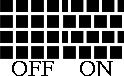
Stagger
-
- Offsets repeated patterns of the texture (when the Urepeat value and/or the Vrepeat value is greater than 1) so that alternate rows are offset exactly half, like bricks in a brick wall. When Stagger is OFF, the repeated patterns line up horizontally and vertically. The default setting is OFF.
|
|
|
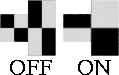
Worldspace
-
- Causes the texture to use a worldspace mapping technique. This can help minimize texture distortion, particularly when multiple surface elements are connected to form a continuous surface. Use worldspace mapping with extreme caution as it can be very expensive for both memory and time. See Setting Up for Worldspace Texture Mapping in the Modeling in Alias book for more information on using this parameter. The default setting is OFF.
|
|
|
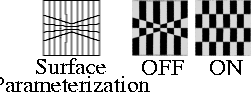
Chord Length
-
- Causes the texture to use a mapping technique that ignores the UV parameterization of the (spline-based) surface, and instead maps according to surface distances (measured in world space units). This can help minimize texture distortion on surfaces with non-uniform parameterization. The default setting is OFF.
Label Mapping
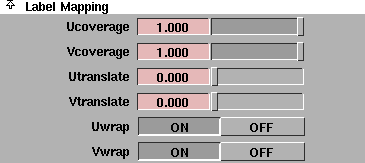
The Label Mapping parameters control how the texture covers the surface. See Label Mapping on page 128.
|
|
|
Ucoverage, Vcoverage
-
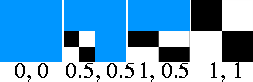
- The fraction of the surface covered by the texture along the surface's U and V parametric directions. For example, if the Ucoverage and Vcoverage values are both 0.5, the texture will cover half of the surface in the U direction and half of the surface in the V direction, or one quarter of the total surface. Areas outside of the texture coverage area have a non-texture mapped parameter value as indicated in the shader's Control Window (for example, the shader color). The slider range is 0 to 1. The default value is 1.
|
|
|
Utranslate, Vtranslate
-
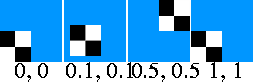
- Moves the texture coverage area along the surface's U and V parametric directions. Effectively, the Utranslate and Vtranslate values determine where the texture map will be located on the surface. The slider range is 0 to 1. The default setting is 0.
|
|

|
Uwrap, Vwrap
-
- Determines whether or not the texture will replicate (copy itself outside of the coverage area) in the surface's U and V parametric directions, when the Utranslate or Vtranslate value is greater than 0.
-
- By default, both Uwrap and Vwrap are ON. Toggle these parameters OFF to prevent seams from showing on a closed surface, such as a cylinder or sphere, or to prevent the texture from duplicating itself when you are using the translation and coverage parameters to limit the mapping to a very specific surface area.
|


