|
Animation > Copy keyframes |
Copying Keyframe Animation | ||
|
| |||
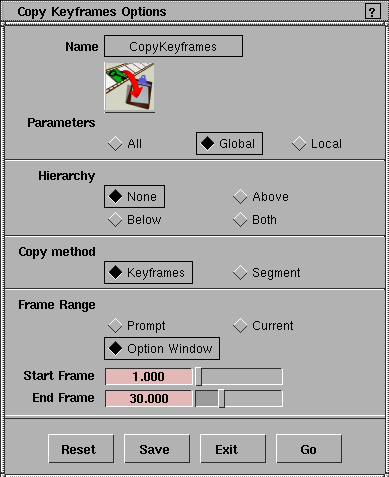
Copy keyframes lets you copy a range of keyframes from an animated object, and place them on the keyframe clipboard for pasting somewhere else. OverviewWhen working with animated sequences it is often necessary to copy a sequence from one object to another, or to repeat a sequence. Copy keyframes and Paste keyframes provide a simple way to do this. Copy keyframes lets you select an object and specify a range of keyframes from the object's animations to copy. The selected keyframes are then copied to a keyframe clipboard, which lets you mirror or paste the keyframes onto another object (or even back onto itself). How to Use>
| |||
|
To copy a single frame, type the same frame number for both the start and end frame. |
| ||
|
See Animation > Paste keyframes on page 70 for information on how to paste keyframes. |
Copy Keyframes Options
Select Copy keyframes -
Parameters
| ||
|
To select different global animation parameters, see Animation > Param control on page 19. |
| ||
|
To select different local animation parameters, see Animation > Param control on page 19. |
Hierarchy
| ||
|
If set to Segment, and if either the start frame or the end frame lie outside the defined range of the animation, keyframes that correspond to the extrapolation setting for the curve are copied to the keyframe clipboard (See the section describing the Action Tools menu in The Action Window on page 138 for details about extrapolation settings). |
Copy method
Frame range
Start frame/End frame
|
| Copyright © 1998, Alias|Wavefront, a division of Silicon Graphics Limited. All rights reserved. | Please send questions or comments regarding the documentation to: [email protected] |
 to display the Copy Keyframes Options window.