|
|
|
Perimeter
Determination
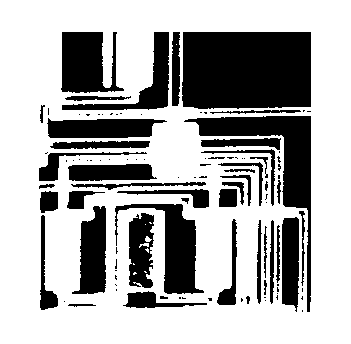
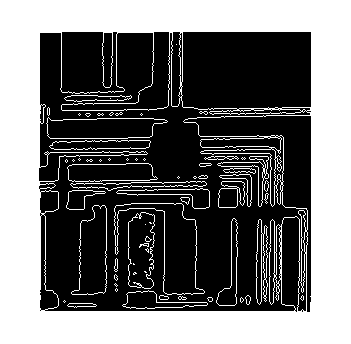
Example 1
Find
perimeter pixels in the circuit (circbw.tif) image.
Solution
bw1= imread('circbw.tif');
bw2 = bwperim(bw1);
imshow(bw1)
figure, imshow(bw2)
Result
Filling color in
object
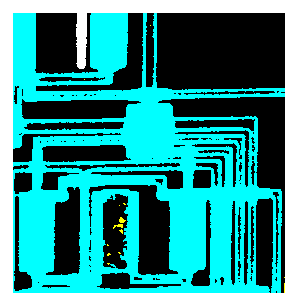
Example 2
Display 'circwbw.tif'' in different colors to
distinguish different objects..
Solution
bw1=imread( 'circbw.tif');
bw2=bwperim(bw1);
imshow(bw1)
figure; imshow(bw2)
x=bwlabel(bw1,4);
map=[0 0 0;jet(3)];
imshow(x+1,map, 'notruesize')
Result
.
Task 1
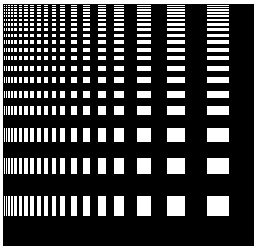
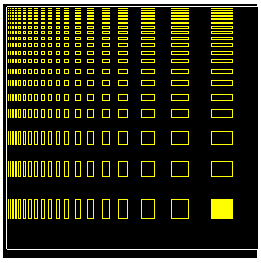
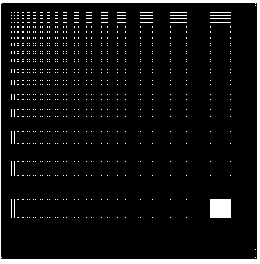
Take image testpat2
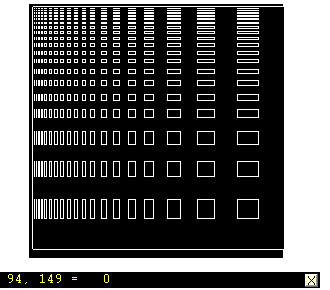
a) get the perimeter pixels,
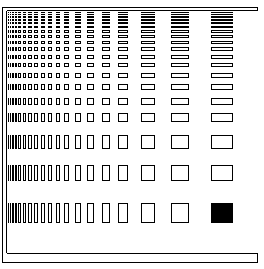
b) using flood fill make the lower right square
black,
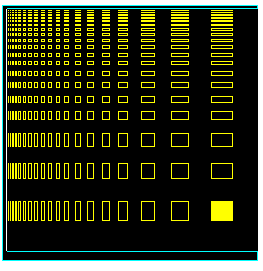
c) label the 4 and 8 connected components,
d) what is the algorithm used for look up
tables
e) make a 2x2 neighborhood LUT and write down
your results.
Solution
% read image
a=imread( 'testpat2.tif');
imshow(a)
% get perimeter
b=bwperim(a);
figure; imshow(b)
% using flood fill
to make the lower right square block
pixval on
d =
bwfill(b,211,201,4);
e=~d;
figure, imshow(e)
% labeling 4
connected components
f = bwlabel(d,4);
map = [0 0
0;jet(3)];
figure,
imshow(f+1,map)
%labeling 8
connected components
g=bwlabel(d)
%bwlabel uses an 8-connected foreground
by default.
map = [0 0
0;jet(2)];
figure,
imshow(g+1,map)
% making a 2*2
neighbourhood lut
f=inline( 'sum(x(:))>=3');
lut = makelut(f,2);
h=applylut(d,lut);
figure, imshow(h)
Result
.     
HELP
ERODE
ERODE Perform erosion on binary image.
BW2 = ERODE(BW1,SE) performs erosion on the binary image BW1
using the binary structuring element SE. SE is a matrix
containing only 1's and 0's.
BW2 = ERODE(BW1,SE,ALG) performs erosion using the specified
algorithm. ALG is a string that can have one of these values:
'spatial' (default) - processes the image in the spatial
domain. This algorithm works well for relatively small images
and structuring elements, but for large images and structuring
elements it can be slow.
'frequency' - processes the image in the frequency domain.
This algorithm is faster for large images and structuring
elements than 'spatial', but uses much more memory.
The spatial and frequency algorithms produce the same result,
but make different tradeoffs between speed and memory usage.
If you want to speed up erosion, specify the 'frequency'
algorithm. If you receive "out of memory" messages or if your
computer slows down because of disk paging, specify the
'spatial' algorithm.
BW2 = ERODE(BW1,SE,...,N) performs the erosion operation N
times.
Class Support
The input image BW1 can be of class double or uint8. The
output image BW2 is of class uint8.
Example
BW1 = imread('text.tif');
SE = ones(3,1);
BW2 = erode(BW1,SE);
imshow(BW1), figure, imshow(BW2)
EYE
EYE Identity matrix.
EYE(N) is the N-by-N identity matrix.
EYE(M,N) or EYE([M,N]) is an M-by-N matrix with 1's on the
diagonal and zeros elsewhere.
EYE(SIZE(A)) is the same size as A.
COLORMAP
COLORMAP Color look-up table.
COLORMAP(MAP) sets the current figure's colormap to MAP.
COLORMAP('default') sets the current figure's colormap to the
root's default, whose setting is JET.
MAP = COLORMAP retrieves the current colormap. The values are
in the range from 0 to 1.
A color map matrix may have any number of rows, but it must
have exactly 3 columns. Each row is interpreted as a color,
with the first element specifying the intensity of red light,
the second green, and the third blue. Color intensity
can be specified on the interval 0.0 to 1.0.
For example, [0 0 0] is black, [1 1 1] is white, [1 0 0]
is pure red, [.5 .5 .5] is gray, and [127/255 1 212/255] is
aquamarine.
Graphics objects that use pseudocolor -- SURFACE and PATCH
objects, which are created by the functions MESH, SURF, and
PCOLOR -- map a color matrix, C, whose values are in the range
[Cmin, Cmax], to an array of indices, k, in the range [1, m].
The values of Cmin and Cmax are either min(min(C)) and
max(max(C)), or are specified by CAXIS. The mapping is linear,
with Cmin mapping to index 1 and Cmax mapping to index m. The
indices are then used with the colormap to determine the color
associated with each matrix element. See CAXIS for details.
Type HELP GRAPH3D to see a number of useful colormaps.
COLORMAP is an M-file that sets the Colormap property of the
current figure.
IMAGESC
IMAGESC Scale data and display as image.
IMAGESC(...) is the same as IMAGE(...) except the data is
scaled to use the full colormap.
IMAGESC(...,CLIM) where CLIM = [CLOW CHIGH] can specify the
scaling.
DILATE
DILATE Perform dilation on binary image.
BW2 = DILATE(BW1,SE) performs dilation on the binary image
BW1, using the binary structuring element SE. SE is a matrix
containing only 1's and 0's.
BW2 = DILATE(BW1,SE,ALG) performs dilation using the specified
algorithm. ALG is a string that can have one of these values:
'spatial' - processes the image in the spatial domain. This
algorithm works well for relatively small images and
structuring elements, but for large images and structuring
elements it can be slow. This is the default algorithm.
'frequency' processes the image in the frequency domain. This
algorithm is faster for large images than 'spatial', but uses
much more memory.
The spatial and frequency algorithms produce the same result,
but make different tradeoffs between speed and memory use. If
you want to speed up dilation, specify the 'frequency'
algorithm. If you receive "out of memory" messages when you
perform dilation, specify the 'spatial' algorithm.
BW2 = DILATE(BW1,SE,...,N) performs the dilation operation N
times.
Class Support
The input image BW1 can be of class double or uint8. The
output image BW2 is of class uint8.
Example
BW1 = imread('text.tif');
SE = ones(6,2);
BW2 = dilate(BW1,SE);
imshow(BW1)
figure, imshow(BW2)
ERODE
ERODE Perform erosion on binary image.
BW2 = ERODE(BW1,SE) performs erosion on the binary image BW1
using the binary structuring element SE. SE is a matrix
containing only 1's and 0's.
BW2 = ERODE(BW1,SE,ALG) performs erosion using the specified
algorithm. ALG is a string that can have one of these values:
'spatial' (default) - processes the image in the
spatial domain. This algorithm works well for relatively small
images and structuring elements, but for large images and
structuring elements it can be slow.
'frequency' - processes the image in the frequency
domain. This algorithm is faster for large images and
structuring elements than 'spatial', but uses much more
memory.
The spatial and frequency algorithms produce the same result,
but make different tradeoffs between speed and memory usage.
If you want to speed up erosion, specify the 'frequency'
algorithm. If you receive "out of memory" messages or if your
computer slows down because of disk paging, specify the
'spatial' algorithm.
BW2 = ERODE(BW1,SE,...,N) performs the erosion operation N
times.
Class Support
The input image BW1 can be of class double or uint8. The
output image BW2 is of class uint8.
Example
BW1 = imread('text.tif');
SE = ones(3,1);
BW2 = erode(BW1,SE);
imshow(BW1), figure, imshow(BW2)
CV
Lab 1 CV
Lab2
CV
Lab 3
CV Lab4
CV
Lab 5
CV
Lab 6
CV
Lab7 CV
Lab8
Other
material
|
|
|