|
|
|
The MATLAB (Matrix Lab)
Image processing
Toolbox has a large variety of functions that supports a wide
range of image processing operations, including:
-
Geometric Operations
-
Neighborhood and block operations
-
Linear Filtering and filter design
-
Transforms
-
Image analysis and enhancement
-
Binary image operations
-
Region of interest operations
MATLAB provides commands for reading,
writing, and displaying several types of graphics file formats
images. MATLAB supports the following graphics file formats.
-
BMP (Microsoft Windows Bitmap)
-
HDF (Hierarchical Data Format)
-
JPEG (Joint Photographic Experts Group)
-
PCX (Paintbrush)
-
PNG (Portable Network Graphics)
-
TIFF (Tagged Image File Format)
-
XWD (X Window Dump)
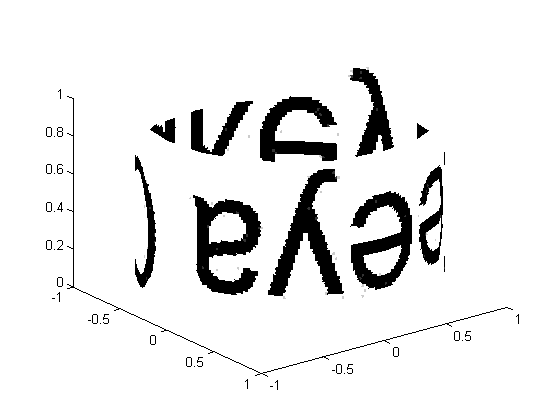
Texture
Mapping
Example
[x,y,z]=cylinder;
i=imread('zia3.jpg');
imhow(i);
warp(x,y,z,i);
Result

Following figure is after warp(x,y,z,i)
Querying
a Graphics file
Example
imfinfo('zeya.bmp')
Result
ans =
Filename: 'zeya.bmp'
FileModDate: '26-Oct-2009 01:44:16'
FileSize: 213470
Format: 'bmp'
FormatVersion: 'Version 3 (Microsoft Windows 3.x)'
Width: 345
Height: 206
BitDepth: 24
ColorType: 'truecolor'
FormatSignature: 'BM'
NumColormapEntries: 0
Colormap: []
RedMask: []
GreenMask: []
BlueMask: []
ImageDataOffset: 54
BitmapHeaderSize: 40
NumPlanes: 1
CompressionType: 'none'
BitmapSize: 213416
HorzResolution: 0
VertResolution: 0
NumColorsUsed: 0
NumImportantColors: 0
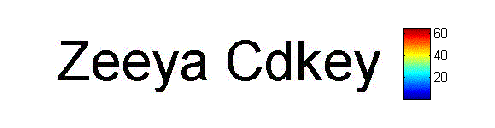
Adding
a Colorbar
Example
i=imread('zia3.jpg');
imshow(i),colorbar
Result
Storing
TIFF and PNG file formats
Task #1
How
we can store TIFF and PNG file formats
Solution
i = imread('zia2.tif');
imshow (i);
imwrite(i,'zeeya.bmp');
Result
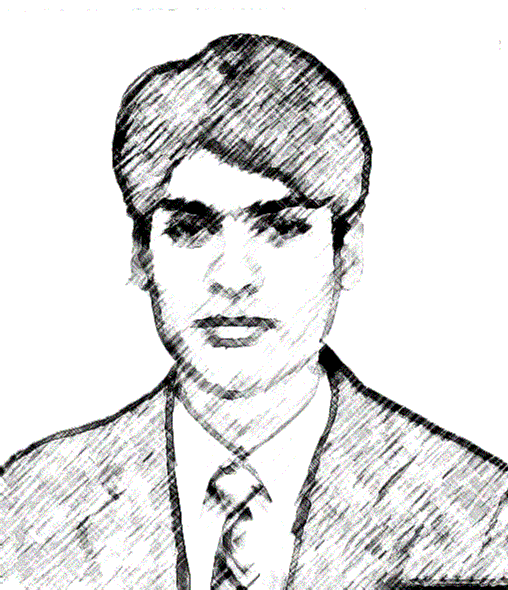
Above file (zia2.tif) saved as zeeya.bmp
Querying a
Graphics file
Task # 2
What information is at least available
for different file formats?
Compare BMP, PNG, TIFF and JPG file
formats descriptions via imfinfo
Result
Filename
FileModDate
FileSize
Format
FormatVersion
Width
Height
BitDepth
ColorType
FormatSignature
Note: Above is maximum information available
by JPG file format, all other formats include this information
in excess.
HELP
IMREAD
IMREAD Read image from graphics file.
A = IMREAD(FILENAME,FMT) reads the image in FILENAME into
A. If the file contains a grayscale intensity image, A is
a two-dimensional array. If the file contains a truecolor
(RGB) image, A is a three-dimensional (M-by-N-by-3) array.
FILENAME is a string that specifies the name of the
graphics file, and FMT is a string that specifies the
format of the file. The file must be in the current
directory or in a directory on the MATLAB path. If IMREAD
cannot find a file named FILENAME, it looks for a file
named FILENAME.FMT.
The possible values for FMT include:
'jpg' or 'jpeg' Joint Photographic Experts Group (JPEG)
'tif' or 'tiff' Tagged Image File Format (TIFF)
'bmp' Windows Bitmap (BMP)
'png' Portable Network Graphics
'hdf' Hierarchical Data Format (HDF)
'pcx' Windows Paintbrush (PCX)
'xwd' X Window Dump (XWD)
[X,MAP] = IMREAD(FILENAME,FMT) reads the indexed image in
FILENAME into X and its associated colormap into MAP.
Colormap values in the image file are automatically
rescaled into the range [0,1].
[...] = IMREAD(FILENAME) attempts to infer the format of the
file from its content.
Data types
In most of the image file formats supported by IMREAD,
pixels are stored using 8 or fewer bits per color plane.
When reading such a file, the class of the output (A or X)
is uint8. IMREAD also supports reading 16-bit-per-pixel
data from TIFF and PNG files; for such image files, the
class of the output (A or X) is uint16.
TIFF-specific syntaxes
[...] = IMREAD(...,IDX) reads in one image from a
multi-image TIFF file. IDX is an integer value that
specifies the order that the image appears in the file.
For example, if IDX is 3, IMREAD reads the third image in
the file. If you omit this argument, IMREAD reads the
first image in the file.
PNG-specific syntaxes
[...] = IMREAD(...,'BackgroundColor',BG) composites any
transparent pixels in the input image against the color
specified in BG. If BG is 'none', then no compositing is
performed. Otherwise, if the input image is indexed, BG
should be an integer in the range [1,P] where P is the
colormap length. If the input image is grayscale, BG
should be an integer in the range [0,1]. If the input
image is RGB, BG should be a three-element vector whose
values are in the range [0,1]. The string
'BackgroundColor' may be abbreviated.
If the ALPHA output argument is used (see below), then BG
defaults to 'none' if not specified by the
user. Otherwise, if the PNG file contains a background
color chunk, that color is used as the default value for
BG. If ALPHA is not used and the file does not contain a
background color chunk, then the default value for BG is 1
for indexed images; 0 for grayscale images; and [0 0 0]
for RGB images.
[A,MAP,ALPHA] = IMREAD(...) returns the alpha channel if
one is present; otherwise ALPHA is []. Note that MAP may
be empty if the file contains a grayscale or truecolor
image.
HDF-specific syntaxes
[...] = IMREAD(...,REF) reads in one image from a
multi-image HDF file. REF is an integer value that
specifies the reference number used to identify the image.
For example, if REF is 12, IMREAD reads the image whose
reference number is 12. (Note that in an HDF file the
reference numbers do not necessarily correspond with the
order of the images in the file. You can use IMFINFO to
match up image order with reference number.) If you omit
this argument, IMREAD reads the first image in the file.
Supported file types
JPEG Any baseline JPEG image; JPEG images with some
commonly used extensions
TIFF Any baseline TIFF image, including 1-bit, 8-bit, and
24-bit uncompressed images; 1-bit, 8-bit, and 24-bit
images with packbits compression; 1-bit images with
CCITT compression; also, 16-bit grayscale, 16-bit
indexed, and 48-bit RGB images
BMP 1-bit, 4-bit, 8-bit, and 24-bit uncompressed images;
4-bit and 8-bit run-length encoded (RLE) images
PNG Any PNG image, including 1-bit, 2-bit, 4-bit, 8-bit,
and 16-bit grayscale images; 8-bit and 16-bit
indexed images; 24-bit and 48-bit RGB images
HDF 8-bit raster image datasets, with or without an
associated colormap; 24-bit raster image datasets
PCX 1-bit, 8-bit, and 24-bit images
XWD 1-bit and 8-bit ZPixmaps; XYBitmaps; 1-bit XYPixmap
IMSHOW
IMSHOW Display image.
IMSHOW(I,N) displays the intensity image I with N discrete
levels of gray. If you omit N, IMSHOW uses 256 gray levels on
24-bit displays, or 64 gray levels on other systems.
IMSHOW(I,[LOW HIGH]) displays I as a grayscale intensity
image, specifying the data range for I. The value LOW (and any
value less than LOW) displays as black, the HIGH (and any
value greater than HIGH) displays as white, and values
in between display as intermediate shades of gray. IMSHOW uses
the default number of gray levels. If you use an empty matrix
([]) for [LOW HIGH], IMSHOW uses [min(I(:)) max(I(:))]; the
minimum value in I displays as black, and the maximum value
displays as white.
IMSHOW(BW) displays the binary image BW. Values of 0 display
as black, and values of 1 display as white.
IMSHOW(X,MAP) displays the indexed image X with the colormap
MAP.
IMSHOW(RGB) displays the truecolor image RGB.
IMSHOW(...,DISPLAY_OPTION) displays the image, calling
TRUESIZE if DISPLAY_OPTION is 'truesize', or suppressing the
call to TRUESIZE if DISPLAY_OPTION is 'notruesize'. Either
option string can be abbreviated. If you do not supply this
argument, IMSHOW determines whether to call TRUESIZE based on
the setting of the 'ImshowTruesize' preference.
IMSHOW(x,y,A,...) uses the 2-element vectors x and y to
establish a nondefault spatial coordinate system, by
specifying the image XData and YData.
IMSHOW(FILENAME) displays the image stored in the graphics
file FILENAME. IMSHOW calls IMREAD to read the image from the
file, but the image data is not stored in the MATLAB
workspace. The file must be in the current directory or on the
MATLAB path.
H = IMSHOW(...) returns the handle to the image object created
by IMSHOW.
Class Support
The input image can be of class uint8, uint16, or double.
Remarks
You can use the IPTSETPREF function to set several toolbox
preferences that modify the behavior of IMSHOW:
- 'ImshowBorder' controls whether IMSHOW displays the image
with a border around it.
- 'ImshowAxesVisible' controls whether IMSHOW displays the
image with the axes box and tick labels.
- 'ImshowTruesize' controls whether IMSHOW calls the TRUESIZE
function.
For more information about these preferences, see the
reference entry for IPTSETPREF.
IPTSETPREF
IPTSETPREF Set Image Processing Toolbox preference.
IPTSETPREF(PREFNAME,VALUE) sets the Image Processing Toolbox
preference specified by the string PREFNAME to VALUE. The
setting persists until the end of the current MATLAB session,
or until you change the setting. (To make the value persist
between sessions, put the command in your startup.m file.)
Preference names are case insensitive and can be
abbreviated.
The following preference values can be set:
'ImshowBorder' 'loose' (default) or 'tight'
If 'ImshowBorder' is 'loose', IMSHOW displays images
with a border between the image and the edges of the
figure window, thus leaving room for axes labels,
titles, etc. If 'ImshowBorder' is 'tight', then IMSHOW
adjusts the figure size so that the image entirely fills
the figure. (However, there may still be a border if the
image is very small, or if there are other objects
besides the image and its axes in the figure.)
'ImshowAxesVisible' 'on' or 'off' (default)
If 'ImshowAxesVisible' is 'on', IMSHOW displays images
with the axes box and tick labels. If
'ImShowAxesVisible' is 'off', IMSHOW displays images
without the axes box and tick labels.
'ImshowTruesize' 'auto' (default) or 'manual'
If 'ImshowTruesize' is 'manual', IMSHOW does not call
TRUESIZE. If 'ImshowTruesize' is 'auto', IMSHOW
automatically decides whether to call TRUESIZE. (IMSHOW
calls TRUESIZE if there will be no other objects in the
resulting figure besides the image and it axes.) You can
override this setting for an individual display by
specifying the DISPLAY_OPTION argument to IMSHOW, or you
can call TRUESIZE manually after displaying the image.
'TruesizeWarning' 'on' (default) or 'off'
If 'TruesizeWarning' is 'on', TRUESIZE displays a
warning if the image is too large to fit on the
screen. If 'TruesizeWarning' is 'off', TRUESIZE does not
display the warning. Note that this preference applies
even when you call TRUESIZE indirectly, such as through
IMSHOW.
IPTSETPREF(PREFNAME) displays the valid values for PREFNAME.
Example
iptsetpref('ImshowBorder', 'tight')
IMFINFO
IMFINFO Information about graphics file.
INFO = IMFINFO(FILENAME,FMT) returns a structure whose fields
contain information about an image in a graphics file.
FILENAME is a string that specifies the name of the graphics
file, and FMT is a string that specifies the format of the
file. The file must be in the current directory or in a
directory on the MATLAB path. If IMFINFO cannot find a file
named FILENAME, it looks for a file named FILENAME.FMT.
The possible values for FMT include:
'bmp' Windows Bitmap (BMP)
'hdf' Hierarchical Data Format (HDF)
'jpg' or 'jpeg' Joint Photographric Experts Group
'pcx' Windows Paintbrush (PCX)
'png' Portable Network Graphics (PNG)
'tif' or 'tiff' Tagged Image File Format (TIFF)
'xwd' X Window Dump (XWD)
If FILENAME is a TIFF or HDF file containing more than one
image, INFO is a structure array with one element for each
image in the file. For example, INFO(3) would contain
information about the third image in the file.
INFO = IMFINFO(FILENAME) attempts to infer the format of the
file from its content.
The set of fields in INFO depends on the individual file and
its format. However, the first nine fields are always the
same. These common fields are:
Filename A string containing the name of the file; if
the file is not in the current directory, the
string contains the full pathname of the file
FileModDate A string containing the modification date
of the file
FileSize An integer indicating the size of the file in
bytes
Format A string containing the file format, as
specified by FMT; for JPEG and TIFF files, the three-letter
variant is returned
FormatVersion A string or number specifying the file
format version
Width An integer indicating the width of the image in
pixels
Height An integer indicating the height of the image in
pixels
BitDepth An integer indicating the number of bits per
pixel
ColorType A string indicating the type of image; either
'truecolor' for a truecolor (RGB) image, 'grayscale' for a
grayscale intensity image, or 'indexed', for an indexed image
CV
Lab 1 CV
Lab2
CV
Lab 3
CV Lab4
CV
Lab 5
CV
Lab 6
CV
Lab7 CV
Lab8
Other
material
|
|
|