 |
Editing the Windows Registry
Editing the Windows registry is a hazardous procedure. If you make a mistake, you may have to reinstall Windows. For this reason, ALWAYS make a backup copy of your registry before making any changes. Don't say you weren't warned!
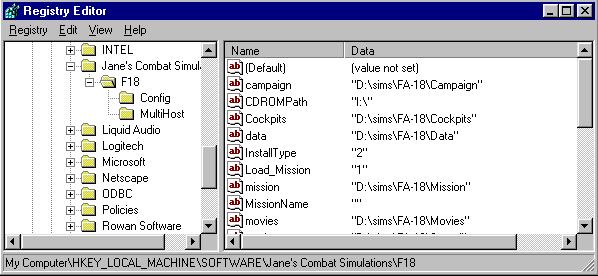
1. To enable the assigning of campaign goals in the mission builder, open the registry using REGEDIT.EXE. Go to the following key:
HKEY_LOCAL_MACHINE\SOFTWARE\Jane's Combat Simulations\F18
|
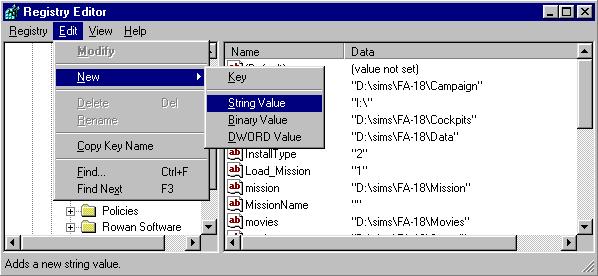
2. Open the edit menu and select the option to add a new string:
 |
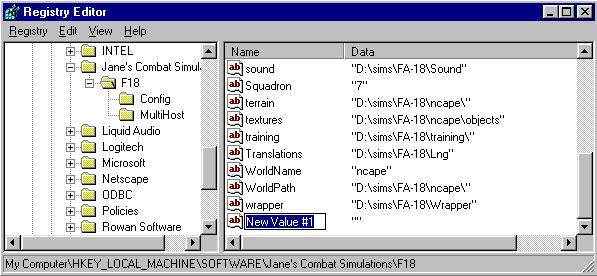
3. A new string will appear in the key window:
 |
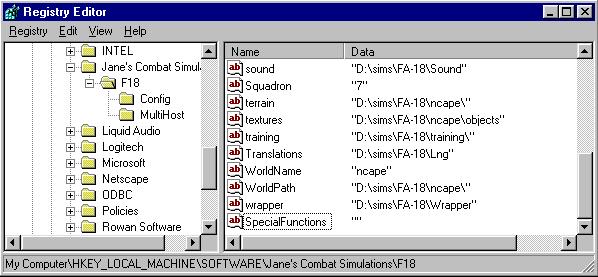
4. Type 'SpecialFunctions' as the name of the new string.
 |
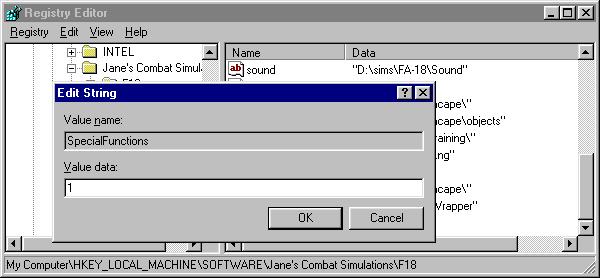
5. Select the option to edit this string from the edit menu. In the editing window that opens, enter the numeral '1' in the 'value data' box.
 |
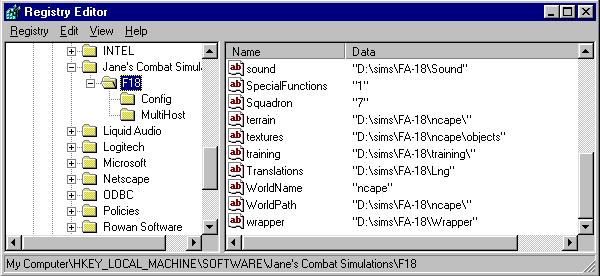
6. Click 'OK'. The new string and its value is now entered:
 |
Questions or comments should be directed to [email protected]