 |
5. Global Links
Global links are a way of linking to a node from any other node in the campaign. They are usually triggered by a campaign variable being set to a particular value. Global links are used when it is not known by the designer at which node the triggering condition will be realized. A look at the global links that are built-in to the campaign template should make this clear.
Click on the 'global link' button:
|
The global-link window will open:
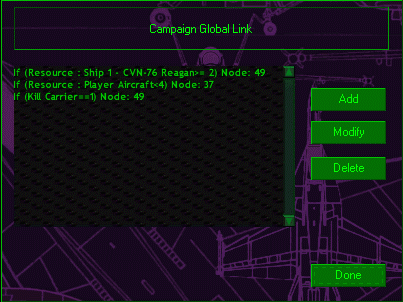 |
The first link is triggered when the carrier is damaged (although this feature appears not to work). The link is to node #49, which shows the movie of the Reagan sinking. The third link is triggered by a campaign variable that is set when the Reagan is killed in a particular mission. This also links to node #49. The second global link takes you to node #37 when the player runs out of aircraft. This node displays a text message that tells the player why the campaign is ending. The first two nodes have to be linked to globally, because the triggering events could occur at any node. It would be highly inefficient to add a link to node #49 from EVERY other node. Similarly, if there is more than one node at which the Kill Carrier variable can be set to 1, it is inefficient to place separate links to node #49 when the job can be done with a single global link.
The global links are linked to from the node at which the triggering event takes place. They are processed in order. For this reason, global links which end the campaign should always be placed at the top of the list.
To modify a global link, select a link from the list and click the 'modify' button. The global-link modify window will open:
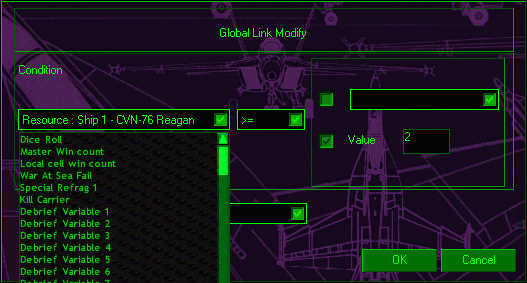 |
Click on the drop-box on the left to select the relevant variable. On the right one enters the condition the variable has to be in to trigger the link. In the lower box, one enters the node which will be linked to:
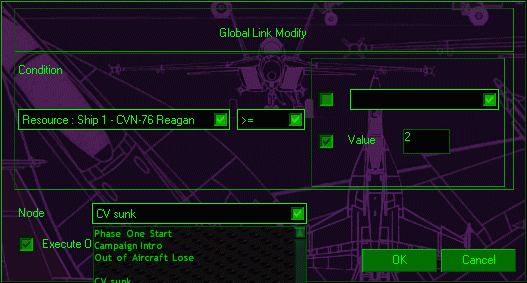 |
All the nodes in the campaign are listed in this drop-box. They are identified by their names, which is why it is a good idea to give your nodes names. Beneath the lower drop-box is a check-box. This box should be checked if the link is to be followed only once.
Summary
Use global links when there is a node you want the game to be able to go to at any time. This will usually be when one of the conditions for ending the campaign is met, such as the carrier being sunk.
Questions or comments should be directed to [email protected]