USENET
(THE NEWSGROUPS) USENET
(THE NEWSGROUPS)
To
configure Outlook Express for reading Usenet
newsgroups, follow these steps:
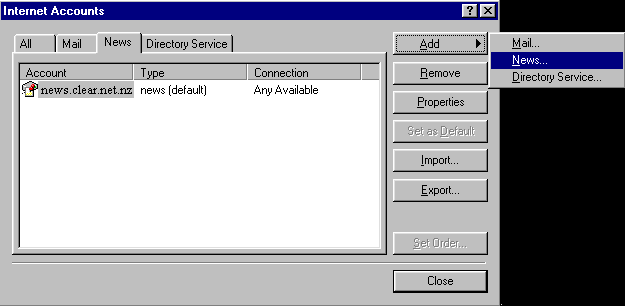
1. In
Outlook Express, click the Tools menu then
Accounts.
2. In the
Internet Accounts dialog box, click Add, and then
click News.
3. In the
Display Name box, type the name you want other
people to see when you post a message to Usenet,
and then click Next.
4. In the
email Address box, type the email address for the
account you are using (for example, "[email protected]"),
and then click Next.
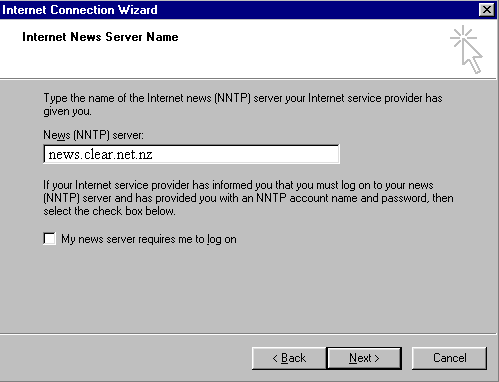
5. In the
News (NNTP) Server box, type in the name of your
newsgroup host (you may need to ring your service
provider for these details, but they are likely
to be on your joining documentation), eg: news.xtra.co.nz
Click Next.
6. In the
Internet News Account Name, type a name that
identifies the news account you are configuring.
This is your casual name for the news account.
Click Next.
7. Click
the connection type that you use to connect to
the Internet, and then click Next.
- If
you're using a modem to connect to the
Internet, click "Use an existing
dial-up connection," and click the
name for your specific Dial-Up Networking
connection in the list from the drop down
menu, and then click Next.
- If
you are part of a LAN connection, and
don't use a modem to access the Internet,
click "Connect using my local area
network (LAN)".
8. Click
Finish.
NEXT...
|