USENET
(THE NEWSGROUPS)
- From
the Message Center menu bar, choose File,
Subscribe.The Subscribe to Folders and
Groups dialog box will appear.
- Click
the Search tab to bring that panel to the
front.
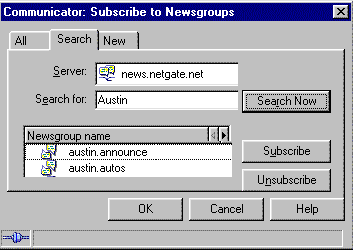
- If
you have access to more than one news
server, choose the server with the
newsgroups you want to search.
- In
the Search for text box, type a keyword
or topic of interest.
- Click
Search.
- Click
the name(s) of the newsgroup(s) you want
to read later.
- Click
Subscribe.
or
Click
to place a checkmark in the checkbox in
the Subscribe column to subscribe to that
newsgroup.
- Repeat
steps 3 through 7 for each topic you want
to find.
- When
you're finished, click OK to close the
Subscribe to Folders and Groups dialog
box. The Message Center window will
reappear.
You'll see
the newsgroups you selected in the Message Center
folder list.
NEXT...
(information
provided courtesy of Netscape)
|