USENET
(THE NEWSGROUPS)
- If
the Message Center window is not on your
screen, open it by selecting
Communicator, Messenger from the
Navigator menu bar.
- From
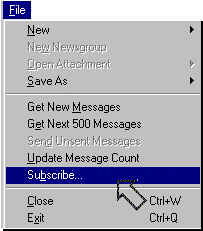
the Message Center menu bar, choose File,
Subscribe. The Subscribe to Folders and
Newsgroups dialog box will appear.
- If
you have access to more than one
news server, choose the server
that offers the newsgroups you
want from the Server pull-down
menu. For example, you may have
one news server for discussion
groups on your corporate
intranet, and another news server
for Internet newsgroups.
-
 -
- Once
the Subscribe to... dialog box appears,
Communicator will begin downloading a
list of all available groups. This may
take quite a few minutes. If you think
it's taking too long, click Stop. The
server will stop listing the remaining
newsgroups.
- Communicator
organizes newsgroups into folders by
subject.
- To
see the hierarchy (the organized
listing) of newsgroups in a
specific folder, click the plus
sign (+) to the left of the
folder (Windows) or the expander
arrow (triangle) to the left of
the folder (Macintosh). The list
will expand to show all available
listings, some of which will be
newsgroups and some of which will
be additional subhierarchies.
- To
view the full hierarchy of
newsgroups, click Expand All.
Now that
you have a list of available newsgroups, you can
choose one to explore. Keep reading to find out
how to subscribe to a newsgroup that appeals to
you.
NEXT...
(information
provided courtesy of Netscape)
|