|
HDRC Site References
|
|
Home |
|
Previous
Mods & Tips
|
|
1998 |
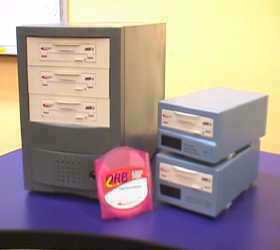 |
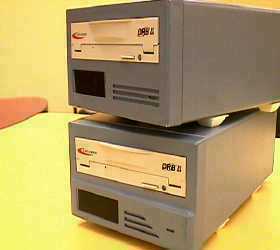
About the MS enclosures The MS enclosures are a necessity to the ORB/HDR system. As of now the MS enclosures that are available are the MST4 and the MSC1. Both are available in HI tech gray and Millennium Frost. Custom colors by request. The MS enclosures were designed to house the ORB removable drives for an external function. No longer do you have to deal with internal hard drive backups or sloppy DAT transfers. All enclosures are independently powered, self cooling, comes with instructions, ORB adapters and the MSC1 comes with a 36" IDE cable. The MST4 requires the MSIDE50 a custom 50" cable (sold separately). The MSIDE50 allows you more distance to place the HDRs in a rack and the MST4 on top or on the side of the rack on the floor. |
 |
OK! That sounds really cool but, what about backups? If ejecting and storing the media is not enough for you, and you want to clone your tracks on another ORB? All right then, here are some options for cloning tracks to another ORB disc. Example #1. Lets say you have one HDR and you want to clone your ORB tracks: (Now, the term "clone" is used because, technically backing up is cloning in case of an emergency). For you single HDR users who want to clone, I suggest dusting off your old internal hard drive for this one. Use an internal as your 2nd HD for storing your songs (and only songs at time in case your HD is smaller than your ORB). There two configurations for this..one, if use an MSC1 and your internal in your 2nd bay you would need an MSIDE52, which is an MSIDE50 with a 2nd connector for another drive. Just mount the MSIDE52 backwards where the connectors are close to the motherboard and the internal HD and the longest connector is in the MSC1. The object is to transfer the songs from the ORB to the internal HD, eject the disc insert a new formatted disc and transfer the internal HD's info to the new disc. |
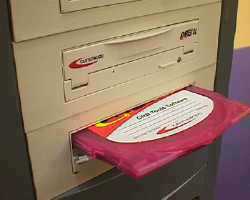 |
By the way, anybody remember those MSB2s we discontinued? Well those boxes make great external cloning systems, ORB drive at the top, internal HD at the bottom and MSIDE52 connecting them all. We still have a few available form those who want to clone. That brings us into Example #2. doing that same configuration works perfect with an MST4 with three ORB drives 2 MSIDE50s and one MSIDE52. The 4th bay is where you would place your internal HD (look under the pink disc, there's an HD hidden Batman style). you will have to still clone song at a time and disc at a time, but at least you can "backup" your ORB discs. Example #3. The easiest way if you are a multiple HDR user, is to transfer tracks on to another HDR via digital outputs or to physically send direct outs from one HDR into the analog inputs of another HDR just make sure they are synced together for accuracy. Cool huh? |