|
For
some of you who have had problems about hard drives. I know I was
one of them. We all know that our units can house 4GB (2GB per drive
bay). Some hard drives work well with the HDRs and some are just
plain problems. From what I have found out that works (for me) is
IBM and Maxtor HDs. A tricky way also is to mix drive combinations.
1.8GB/1.6GB gives 3GB 400MB of record time . Or 850MB/500MB gives
1GB 350MB of record time. (thats if your 2GB per slot configuration
fails).
Before I started this Vestax crusade, I was really frustrated about
my info (or lack of info I was getting). I had went to the Vestax
HDR web site (now discontinued), and read that Seagate was the choice
of champions. "NOT!" I had so many problems with these
drives, Seagate new me personally (Model# ST32122A). So after the
4th return, I had a friend who gave me a Conner 1.6GB. The drive
formatted completely (Seagate couldn't pass that stage). The drive
worked for a week then it crashed. So back to my factory 364MB HD.
So for a complete 3 months I was hard drive horny. I was thinking
what can I do to make this unit work. I wasn't making much music
because I was too busy being a detective technician. Then I wondered,
even if I find the right drive, how will I back it up? I saw that
Vestax made a SCSI card to back up to external drives. Yesss? Oh
hell no! The SCSI card backs up as data not audio. By then I thought,
I should have spent an extra $1500 for an ADAT. Yeah, sure its a
linear format But, I wouldn't have as many problems either.
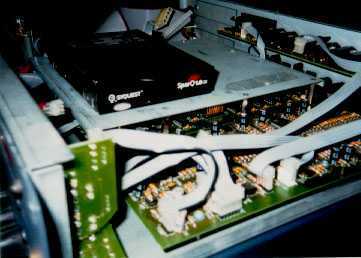 Then
one day it hit me. I saw an ad for the HDR-V8. It had all the features
I was looking for. Though I did not have the money to get it. I
noticed it had a front slot to put a removable drive. and I thought,
if only my units had that feature. Then I saw an ad for the Syquest
Sparq 1.0GB removable HD. So what I thought, until I saw they made
an internal EIDE drive. (As you can see I think too much). I made
a call to Comp USA and asked about the connection compared to a
regular HD. No difference I was told. So, desperate and determined
I bought one and installed it. Powered up and did a stop/ff the
unit read 28:54:28 ( oh, with the disc inserted). Then
one day it hit me. I saw an ad for the HDR-V8. It had all the features
I was looking for. Though I did not have the money to get it. I
noticed it had a front slot to put a removable drive. and I thought,
if only my units had that feature. Then I saw an ad for the Syquest
Sparq 1.0GB removable HD. So what I thought, until I saw they made
an internal EIDE drive. (As you can see I think too much). I made
a call to Comp USA and asked about the connection compared to a
regular HD. No difference I was told. So, desperate and determined
I bought one and installed it. Powered up and did a stop/ff the
unit read 28:54:28 ( oh, with the disc inserted).
|
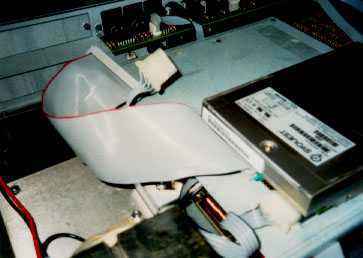 I
tried to format the way you would normally do a drive. unit read
bad HD. Oh no! Then some thing told me to just hit play. "ssshhhccizzzzzzt!"
Bad idea. Then I muted the tracks, and it was spooling. Then I just
recorded 4 tracks of silence, Damn! it works. So it will record
as soon as you plug it in. When installing the syquest, remember
its like a computer HD. So please ground yourself with an anti-static
wrist band. Make sure you are connected to the chassis of the HDR
or any metal with a solid ground. Make sure your HDR is unplugged
when you do this. Install the syquest the way you would a regular
HD like the diagram in your manual. The syquest comes out of the
box with the jumper setting in master mode. You can see from the
photo (little geen plug in the back). Connect your large flat cable
and small power cable, insert the disc, plug in, turn on for the
disc to boot. I
tried to format the way you would normally do a drive. unit read
bad HD. Oh no! Then some thing told me to just hit play. "ssshhhccizzzzzzt!"
Bad idea. Then I muted the tracks, and it was spooling. Then I just
recorded 4 tracks of silence, Damn! it works. So it will record
as soon as you plug it in. When installing the syquest, remember
its like a computer HD. So please ground yourself with an anti-static
wrist band. Make sure you are connected to the chassis of the HDR
or any metal with a solid ground. Make sure your HDR is unplugged
when you do this. Install the syquest the way you would a regular
HD like the diagram in your manual. The syquest comes out of the
box with the jumper setting in master mode. You can see from the
photo (little geen plug in the back). Connect your large flat cable
and small power cable, insert the disc, plug in, turn on for the
disc to boot.
To
test if the HDR accepts the drive and disc, do a stop/ff and if
you get a 28 minute time then you are doing ok. Now to clear the
disc of any info, record all 4 tracks mute the remaining. Record
for the length of the disc and record the unused. Now when it come
time to change discs. . . . Read carefully. Return the counter to
00.00.00 before you take off the cover. Eject the disc with the
eject button, power off the HDR, insert the disc fully, power on
the HDR. What this does is give the HDR a drive to boot info. Because
the HD is removable different info has to be calibrated into the
system. Please keep in mind this is an unauthorized modification
for the HDR 4/6/8 any attempt at this is done at the users own risk.
We are not to be held responsible for any mistakes, malfunctions
or chemical meltdowns.
|