|
HDRC Site References
|
|
Home |
|
Previous
Mods & Tips
|
|
I have to say that since april 9th the Post-IT Page has been doing service to the community. We have been seeing all kinds of ideas, gripes and info sharing on this format, which is good for all of us. Everytime one of us logs on we learn something new everytime. I thought Vno was the one who will go to extremes with experimenting but no, there are so many of you who want the best out of there recorders. I have seen recently the conversation between Bill and Coolscott, these guys have been working as much as we have. But since I am on this issue, I want to address a couple of things that can ease the madness. 1. Bill, by the time you add up all the minidiscs, converters and such you could have just bought an ORB. Vno went nuts trying to back up the ancient way. DAT is going back to the linear days, if you back up to VHS that is basically an ADAT and minidiscs are cassette replacements. They are not accurate for backup thanks to the compression. You have a V8, you are in the prime of true digital access, use it to your advantage. Slap an ORB drive in your front slot and when the disc is full, protect the work and eject, no waiting time. Remember in the real world time is money. $30 of luxury is better that $10 of inconvenience. We all have enough waiting to do in our life, this shouldn't be one of them. 2. Tony Baca, Dude! you are on to something it will get perfected. There is a way to do this, if most of you go to the accessories page to the Bertsch link and go to What's new, the company's DPR-8 (which is nothing but and HDR-V8) headlines, "The Bertsch DPR series now reads and writes .WAV files. Now I figure if this is the company that made these recorders for Vestax then the V8 should do the same with the ORB. ORB the PC and ORB the V8 and swap the disc between both machines. 3. Klaus, I don't know what you are doing. I suggest, delete the song and recreate the song and give it a longer length. If that doesn't do it try another disc, make sure all the pre formatted data is deleted off the disc. That is done by setting A point at 00:00:00 and B point at the end of the disc by pressing stop/FF simultaneously, A/B delete all and then reduce playlist. That will scub off all data in sectors, then try creating a song with the length of 20:00:00. Once that is done test it with the stop/FF and start at 00:00:00 and start recording. 4. Coolscott, yeah you! Vno told me to tell you that he has your problem styled out in fact he is going to show all HDR-6/8 users these new gadgets. Since he started this ORB thing, I thought the same thing you did about the IDE cable out of the option slot. I said, V how are going to deal with removing the cover everytime you want to change the disc, so now after reading your Post-IT he did something about it.
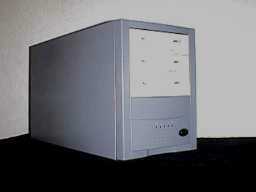
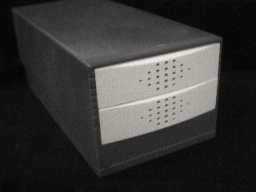
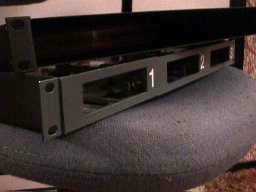
Nothing personal, because the owner of this site has not been able to get his hands on some V8s, he has to find ways to accessories his need for HDR fullness (does that make sense)? Any way, thanks to Coolscott Vno came up with 3 types of external ORB mounts. All have cooling fans and independent power all you do is connect your IDE cable out the option slot. These are pretty easy to make but we thought giving them model names makes it more official do it yourself projects. NOTE: Due to the configuration of these projects, a longer IDE cable was custom made in order to make the transition, we will have those available for these projects.
Getting PC with Tony Baca Community member Tony Baca emailed us with this info, we felt it deserves major attention. Tony, keep us updated as you progress as we will keep the community updated. I am working on a complete description of how I transferred data from the V8 to my pc using cool edit; all in the digital domain. To date I have not succeed in moving the data back from the PC to the V8. Thus, what I did was not really backing-up the V8, it was moving the digital data from the V8 to the PC and keeping it all in sync. So, here is what I did. I connected the V8 digital OUT to the digital IN on the PC. Make sure that the PC is set to record from the digital in and that the V8 is on internal sync. I then configured the V8 to "back up" the song to DAT. As described in the V8 manual, you get to a point where it says press record on the DAT, that is where I press record on the PC. Be sure to record in stereo 16 bits. As best as I can tell when the V8 backs-up to a data, it send each track sequentially, using both channels. thus, it takes half the track time to transfer. there is some kind of "preamble" before each track. Once the V8 is done "backing-up", stop the PC recording and save the resulting file; I used "WAV" format here. Okay, now, using cool edit, we will dissect the "back-up" file into the individual tracks. first, open the "WAV" file. It will look something like this:
In my example, I showed 4 preambles (3-0), a start indicator (S) and then the audio data. I don't remember how many preambles there are, but for our purposes, it does not matter. What you want to do is use the zoom function of cool edit to zoom into the Start indicator (s). Note, it may be very small, but in all my tests it was there. Just look for a single non zero sample after the last preamble. What we want to do is highlight the stereo audio data from just after the (S) bit to the end of the track. Once I was zoomed in enough that I could see the individual bits and could see the single (S) bit, I placed the cursor between the (S) bit and the next bit. I then zoomed out enough to see the entire track. Holding down the shift key, or was it the Ctrl key and click at the end of the track. The entire stereo track 1 should now be highlighted. Go under File save selection and save the highlighted audio data. Now here is the trick, Save the as PCM data and make sure that you do not create a .dat (header) file. You must repeat the zoom, mark, highlight and save for each track. Once
you are finished, use cool edit to open the saved track files, it
will ask you what the format of the file is; the defaults are okay,
but you want to load it as a mono file. What you have done is transfer
the audio data digitally from the V8 |